
What Is Image Content Moderation?
A developer-first guide to what image moderation is, how automated detection works, the pipeline platforms run, the laws that shape it, and when to use an API versus build in-house.
Published 2026-05-22
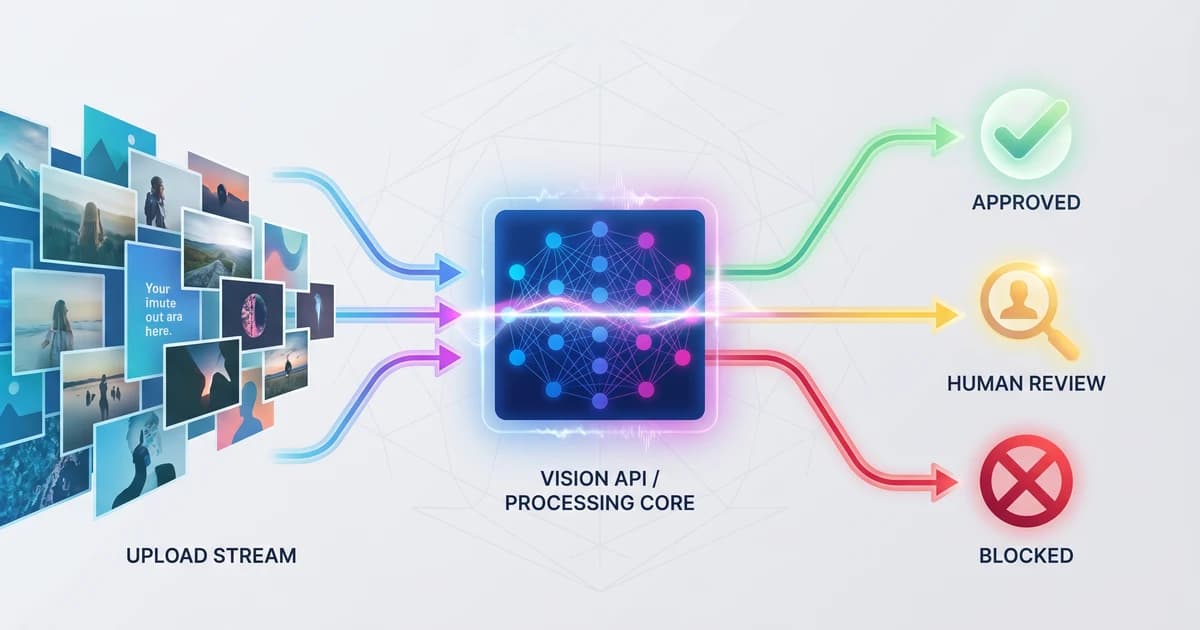
TL;DR. Image content moderation is how a platform decides whether a user-supplied image is allowed to appear, stay, or be removed. It is a pipeline: a vision API such as Pixicular's image analysis API scores categories like nudity, violence, weapons, and self-harm; your backend applies policy thresholds; and human reviewers handle the borderline cases the model flags. Run it pre-publish, post-publish, and on report-driven appeals.
What is image content moderation?
Image content moderation is the set of automated and human processes a platform uses to decide whether an image submitted by a user is safe to publish, should remain on the platform, or should be removed. It sits between the upload button and the public feed. Done well, it is mostly invisible to users: the overwhelming majority of uploads are obviously safe, the small minority that is obviously unsafe is blocked before anyone sees it, and the borderline middle is routed to a trained reviewer with the scored evidence already laid out.
The work splits into three layers. Detection is a vision model that looks at the image and returns confidence scores for policy-relevant categories. Policyis the set of thresholds and rules that turn those scores into actions — what counts as "auto-approve," what counts as "queue," what counts as "auto-block." Review is the human workflow that handles the queued cases, appeals, novel content the model has not seen, and edge cases where context determines the right answer.
Detection is the part most product teams want a vendor for. Policy and review are the parts a product team almost always owns directly, because both depend on the specific community, jurisdiction, and risk appetite of the platform. A photo-sharing app for adults, a children's gaming community, and a medical-imaging archive all consume the same kind of vision API but draw their policy lines in radically different places.
How does automated image moderation work?
An automated moderation system is, at its core, an image classifier with a thick policy layer on top. When an image is submitted, your backend forwards it to a moderation API. The API runs the image through a vision model and returns a JSON document containing a confidence score between 0.0 and 1.0 for each category in the taxonomy — nudity, sexual activity, suggestive, violence, drug use, and so on. Your code reads the scores, compares each one to a configured threshold, and routes the upload accordingly.
The detection step is fast — typically a few hundred milliseconds end-to-end for a standard-sized photo — and the decision step is just a comparison. That total latency is what lets a platform run moderation synchronously as part of the upload flow without users noticing a hang. The same call can return adjacent signals, too: Pixicular's /v1/detect endpoint accepts a comma-separated services parameter so a single multipart upload can return both moderation scores and detected object labels in one round-trip.
Two model families do most of the work in practice. A dedicated moderation model is trained on labelled unsafe content and is what produces the per-category scores. A general object-and-scene model — Pixicular's detect-labels service — surfaces the objects in the frame and is useful as a cross-check. A photo of a knife in a kitchen may score low on Violence but still surface a Knife label; if your platform prohibits weapons regardless of context, the label is the signal that gates the upload.
What does the moderation pipeline look like end to end?
A working pipeline has three time-based layers. Each one covers a class of failure the other two cannot.
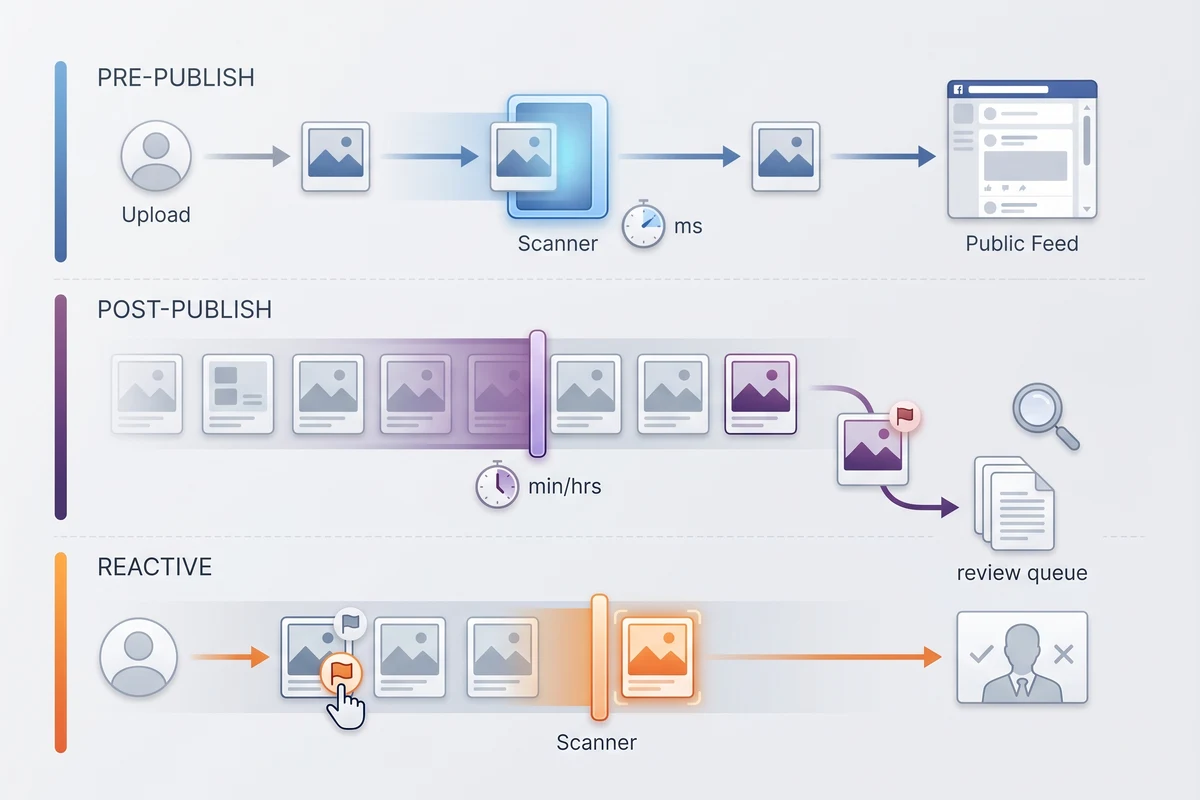
Pre-publish moderation runs synchronously at upload time. The image is sent to the API the moment it arrives at your backend; the API returns scores; your code compares them to thresholds; the upload is either published, held for review, or blocked. Pre-publish is what stops the obviously unsafe minority of uploads from ever reaching the feed. Most platforms aim to run pre-publish on every user upload regardless of audience or account age.
Post-publish moderation runs asynchronously on content that is already live. There are three good reasons to re-scan. First, policy changes — a new rule introduced today should apply to content already on the platform, not only to future uploads. Second, model improvements — when a vendor ships a better moderation model, you want it pointed at recent uploads to catch what the previous version missed. Third, scheduled drift sweeps — language and visual norms shift, and a quarterly sweep is cheap insurance. Post-publish can usually reuse the moderation scores from upload time if you store them, so it does not have to be a second paid API call per image.
Reactive moderationis triggered by an external signal: a user report, a trusted-flagger notice under the EU DSA, a takedown request, or a press query. The pipeline re-scans the reported image, surfaces it to a human reviewer alongside the original moderation scores and any context from the report, and the reviewer makes the final call. Reactive moderation is the layer regulators inspect most closely because it is where the platform's notice-and-action duty lives.
See the practical version of this pipeline applied to a social platform in the UGC image moderation guide.
Which categories of harmful content do moderation APIs detect?
A general-purpose moderation API scores a small fixed taxonomy of categories — each is scored independently so policy can act on them independently. The exact taxonomy varies by vendor, but the common set is below. Note that one category that is deliberately not handled by general moderation APIs is CSAM (child sexual abuse material): that is the domain of specialist hotlines and dedicated detection systems, never a general API.
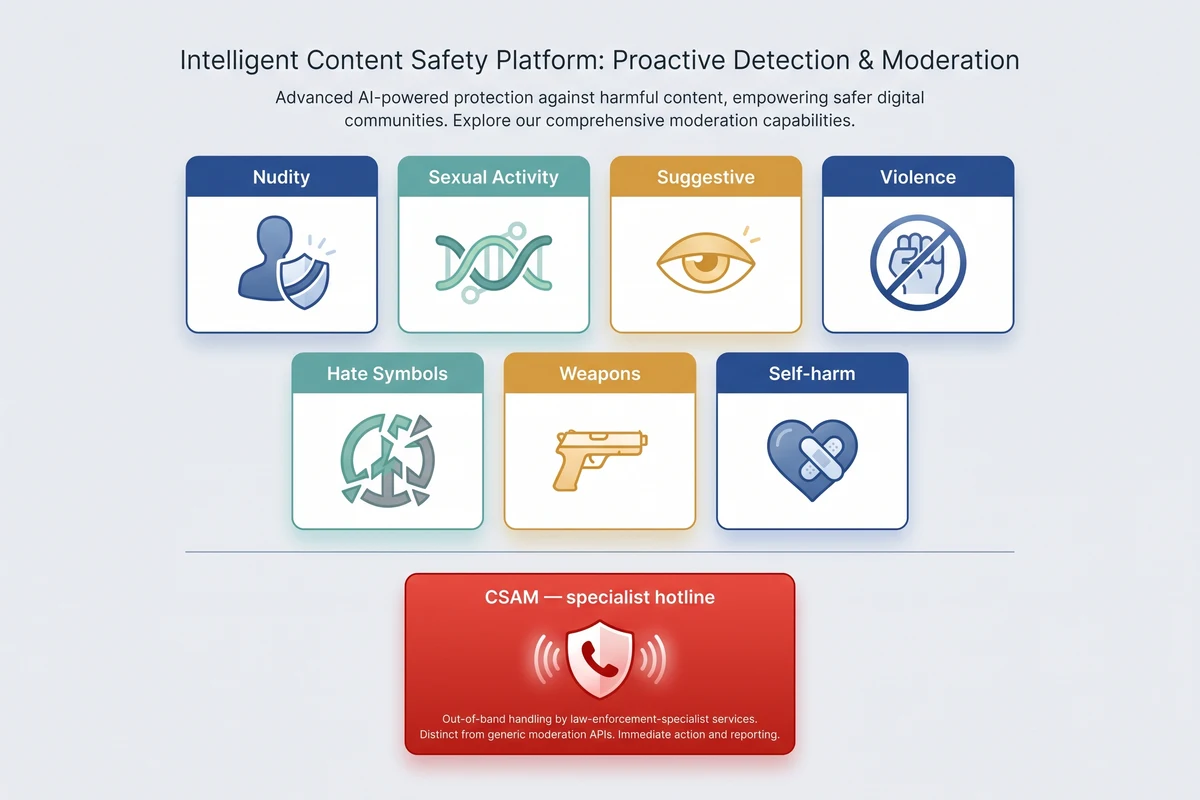
| Category | Pixicular service | What the detector classifies |
|---|---|---|
| Nudity | detect-moderation | Exposed genitalia, female breasts, and buttocks. Scored separately from suggestive content so policy can target the threshold that fits the audience. |
| Sexual activity | detect-moderation | Depicted sexual acts between people. Scored independently of nudity — the act is the policy concern, not the bareness. |
| Suggestive imagery | detect-moderation | Provocative posing, lingerie, swimwear-in-context. The borderline bucket most general-audience platforms route to human review. |
| Graphic violence | detect-moderation | Blood, injury, fights, weapons in use, graphic harm. Auto-block at high confidence; queue at the middle band. |
| Drug imagery | detect-moderation | Illicit drugs, paraphernalia, visible consumption. Medical and educational context typically passes; recreational depiction does not. |
| Hate symbols and gestures | detect-moderation + detect-labels | Hate iconography in the frame, plus cross-checks for known prohibited objects. Hate categories are policy-heavy and usually route to human review. |
| Weapons in frame | detect-labels | Firearm, knife, weapon labels surfaced by the object model — useful as a cross-check when moderation scores are quiet. |
| Self-harm imagery | detect-moderation | Depicted self-injury, suicide-related imagery. Most platforms auto-block and surface a safety resource link to the uploader. |
| CSAM | Specialist hotline + CSAM-detection tool (out of scope for general moderation APIs) | Always handled through NCMEC, IWF, or your national equivalent. Never rely on a general moderation API as the only control here. |
Categories are scored independently and should be acted on independently. A photo can clear every moderation category and still trip a prohibited-object label, or vice versa. Make decisions per signal, not on a single combined score.
Code: call the moderation endpoint
One multipart POST uploads the image and asks for both moderation scoring and label detection in the same request. The response is a single JSON document with one key per requested service.
curl — moderation plus label cross-check
# Score one image for moderation flags and detected labels in a single request.
curl -X POST https://api.pixicular.com/v1/detect \
  -H "Authorization: Bearer $PIXICULAR_API_KEY" \
  -F "image=@./user-upload.jpg" \
  -F "services=detect-moderation,detect-labels"
The same request can be made with a remote URL by sending an imageUrl form field instead of an image file part — see the API documentation for the full request and response schema.
Example response
{
  "detect-moderation": {
    "flags": [
      { "name": "Nudity", "confidence": 0.04 },
      { "name": "Sexual Activity", "confidence": 0.01 },
      { "name": "Suggestive", "confidence": 0.18 },
      { "name": "Violence", "confidence": 0.02 },
      { "name": "Drug Use", "confidence": 0.00 }
    ]
  },
  "detect-labels": {
    "labels": [
      { "name": "Person", "confidence": 0.97 },
      { "name": "Beach", "confidence": 0.83 },
      { "name": "Outdoor", "confidence": 0.79 }
    ]
  },
  "meta": { "processingTimeMs": 388, "requestId": "req_8a14c2" }
}
Your backend reads the scores, applies platform thresholds, and routes the upload to auto-approve, queue for review, or auto-block. The thresholds are policy you own — the API supplies scored inputs, not verdicts.
What are the legal obligations around image moderation?
Two regulatory regimes drive most platform moderation work in 2026. The EU Digital Services Act (DSA) applies to hosting and online-platform services that serve users in the EU, regardless of where the platform is incorporated. It mandates a notice-and-action mechanism for illegal content, an internal complaints handling system (the appeals workflow), transparency reporting on moderation actions, and — for very large online platforms — risk assessments and independent audits. The DSA does not require automated detection in every case, but it explicitly recognises automated tools as part of the moderation toolkit and requires platforms to disclose when they are used.
The UK Online Safety Act (OSA) places duties of care on user-to-user services to assess and mitigate risks from illegal content, and (for services likely to be accessed by children) content harmful to children. Ofcom's codes of practice set out expected measures, including proactive technology for the most serious categories. As in the EU, automated detection is treated as part of the standard toolkit alongside notice-and-action, appeals, transparency reporting, and clear terms.
CSAM is governed by its own dedicated regime worldwide. Detection is handled through specialist hotlines and tools — NCMEC in the United States, IWF in the UK, and your national equivalent elsewhere — using hash-matching against known illegal material, not general moderation classifiers. A general moderation API is not a CSAM tool and should never be the only control for that risk. Work with a specialist provider, and ensure your engineering team has a documented escalation path if a suspected case surfaces in a human review queue.
This page is general information, not legal advice. Confirm the specific obligations for your service, jurisdiction, and user base with qualified counsel.
Should you use a moderation API or build it in-house?
For almost every platform under 100 million monthly active users, an API is the right answer — both as a starting point and as a steady state. The economics are straightforward. Training and operating a competitive moderation model requires a labelled dataset that includes sensitive material, an ongoing labelling pipeline to keep up with drift, GPU capacity for serving, on-call coverage for the model, and a security perimeter around the training data. None of that is the differentiator a product team is paid to build.
An API like Pixicular puts the detection layer behind a single REST endpoint, bills per AI operation, and lets your team focus on the parts that are differentiated — your policy, your review workflow, your appeals UX, and your audit log. You also keep the freedom to swap or augment the detection vendor without rebuilding your moderation product. A reasonable architecture has the moderation client behind a thin internal interface so a future second vendor can run alongside for redundancy or category-specific specialisation.
Build in-house only when one of three conditions applies. First, a regulator or large customer specifically requires data not to leave your environment for the moderation step. Second, you have an unusual category that no general API scores well — for example, a niche policy on a specific cultural symbol that off-the-shelf models do not differentiate. Third, your call volume is large enough that the unit economics of building beat the unit economics of paying per call, which in practice starts at a scale most platforms never reach. Even in those cases, hybrid is common: an in-house model for the differentiated category, an API for the rest.
How do you get started with Pixicular?
Three steps. Sign up on the pricing page and copy an API key. Read the API documentation for authentication, the request format, the full response schema, rate limits, and error codes. Point a fetch request at /v1/detect with a real upload from your platform — the Developer plan includes 1,000 free AI operations a month, which is enough to wire the integration end to end and tune thresholds against a representative sample before committing to a paid plan.
For category-specific deep dives, see the guides on the NSFW / nudity detection API and on UGC image moderation for social platforms. Pricing is per AI operation, so a moderation-plus-labels integration consumes two operations per upload — see the pricing page for per-plan allowances and per-extra-operation rates.
Frequently asked questions
What is image content moderation?
Image content moderation is the process by which a platform decides whether a user-supplied image is allowed to appear, remain visible, or be removed. It combines automated detection (a vision model that scores categories such as nudity, violence, weapons, and hate symbols), platform policy (the thresholds and rules that turn scores into actions), and human review (for borderline cases, appeals, and policy edge cases). Most modern platforms run automated detection as a pre-publish gate and again as a post-publish sweep, with human reviewers handling the small percentage of cases the API flags as borderline.
How does automated image moderation work?
Automated image moderation works by sending an uploaded image to a vision model trained to recognise unsafe content. The model returns a continuous confidence score between 0.0 and 1.0 for each policy category — for example nudity, sexual activity, suggestive content, violence, drug use, and prohibited objects. Your backend compares each score against a per-category threshold and routes the image to auto-approve, queue for review, or auto-block. Modern APIs such as Pixicular bundle moderation scoring with label detection in a single request so each image costs one round-trip rather than several.
What is the difference between pre-publish, post-publish, and reactive moderation?
Pre-publish moderation scores an image at upload time and blocks unsafe content before it appears anywhere on the platform. Post-publish moderation periodically re-scans content that is already live — when policy changes, when models are retrained, or on a scheduled sweep — and removes items that no longer meet policy. Reactive moderation responds to signals from users, trusted flaggers, or regulators: a report arrives, the image is re-checked, and a human reviewer makes the final call with the original scores in context. Most regulated platforms run all three layers because each layer covers gaps the others leave.
Is image content moderation required by law?
Under the EU Digital Services Act (DSA) and the UK Online Safety Act (OSA), user-to-user services must run notice-and-action workflows, publish transparency reports, and (for the most serious categories) use proactive technology to detect illegal content. Neither regime mandates automated detection in every case, but both treat it as part of the standard moderation toolkit, and both regimes recognise that an API-based detection layer plus human review is a reasonable design. CSAM (child sexual abuse material) is handled by specialist hotlines and dedicated detection systems, not general moderation APIs. This page is general information, not legal advice.
Should we use a moderation API or build the model in-house?
For most platforms, an API is the right starting point and the right steady state. Training and maintaining a competitive moderation model requires a labelled dataset that includes sensitive content, an ongoing labelling operation to handle drift, GPUs for serving, and a security perimeter for the training data — work that is usually outside the scope of a product team. An API like Pixicular gives you scored signals immediately; you keep ownership of the policy thresholds, the appeals workflow, and the audit log. Build in-house only when a regulator or customer specifically requires it, or when you have an unusual category an API cannot score for.
Start moderating images with one API call
The quickest way to evaluate Pixicular for image content moderation is to point a request at /v1/detect with a real upload from your platform. Pick a plan on the pricing page and follow the API documentation for authentication and the full response schema for detect-moderation and detect-labels.