
AI Image Moderation for Dating Apps
Screen dating-app profile photos for nudity, explicit content, and likely-underage users — content moderation plus age estimation, structured JSON back from a single API call.
Published 2026-05-20

TL;DR. To moderate profile photos on a dating app, route every upload through Pixicular's image analysis API with detect-moderation and detect-age in one call. Your backend reads the NSFW scores and age range, then auto-approves the safe majority, queues borderline cases for human review, and blocks the unsafe or likely-underage minority before they ever reach other users.
Why dating apps need automated photo moderation
Profile photos are the entire first impression on a dating app, and they are also the attack surface. A fraction of every batch of uploads contains imagery that breaks platform policy outright — explicit nudity, sexual acts, weapons, or drug paraphernalia — and a smaller but more dangerous fraction comes from accounts whose real age sits below the minimum the platform legally accepts. Both classes have to be caught before another user sees the photo. Reactive moderation, where reports trickle in after the photo is already in circulation, is exactly the wrong shape of pipeline for dating: by the time a report arrives, the harm is done.
An automated screening layer flips that default. Every profile photo is scored at upload time, the safe majority publish instantly with no human in the loop, and a human moderation team only sees the small fraction that the API flags as borderline or unsafe. The same single request also returns an estimated age range for each detected face, which is the right place to catch obvious-minor uploads before a profile goes live. The two checks belong in the same request because they share an input (the photo) and a decision point (whether this profile can publish).
How does the profile-photo moderation pipeline work?
The pipeline has five stages: a user uploads a photo, the photo is sent to the moderation API alongside the profile-edit request, the API returns content-moderation flags and a per-face age range in one JSON document, your backend applies per-category thresholds against those scores, and the photo is routed to one of four outcomes — auto-approve, queue for human review, block, or escalate to a stronger identity check.
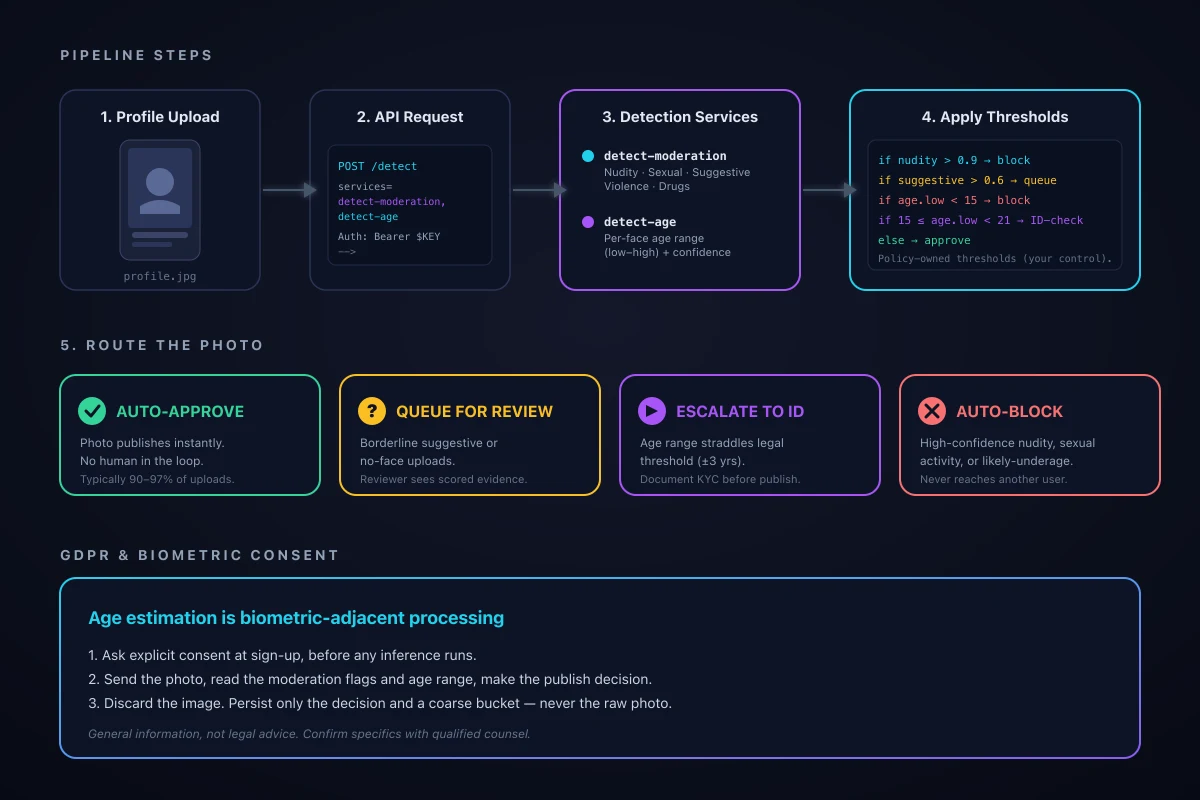
The decision step is deliberately yours rather than the API's. The model returns confidence scores and an age range; your trust-and-safety policy decides which combinations trigger which outcome. A swimwear shot at a beach event might be borderline on Suggestive but fully on-policy for your community; a similar score on a child-focused platform would be a hard block. Keeping the policy in your code means moderation behaviour is auditable and adjustable without an API change.
Which Pixicular services should a dating app use?
Two services cover the core screening needs: detect-moderation for unsafe imagery and detect-age for age estimation. Both can be requested in a single POST, so each profile photo costs one API call rather than two.
| What you screen for | Pixicular service | Signal on a profile photo |
|---|---|---|
| Explicit nudity | detect-moderation | Exposed genitalia, female breasts, or buttocks in a profile photo. |
| Sexual activity | detect-moderation | Explicit sexual acts depicted between people, with or without nudity. |
| Suggestive imagery | detect-moderation | Provocative posing, lingerie, or swimwear-in-context. The borderline bucket most dating apps queue rather than block. |
| Violence and weapons | detect-moderation | Visible firearms, knives, or graphic harm — common red flags on profile photos. |
| Drug imagery | detect-moderation | Visible drug paraphernalia or consumption in the frame. |
| Likely-underage user | detect-age | Estimated age range whose lower bound is below your platform's minimum age — usually 18 on dating apps. |
| Missing or hidden face | detect-age | Empty face list means the model could not locate a face — ask for a clearer photo before publication. |
Categories are scored independently. A photo can return a clean NSFW profile and still trip the age check, or vice versa — decisions should be made per signal, not on a single combined score.
Code: screen a profile photo in TypeScript
One multipart POST to /detect uploads the photo and requests both services. The response is a single JSON document your backend can map to a decision.
curl
curl -X POST https://api.pixicular.com/detect \
  -H "Authorization: Bearer $PIXICULAR_API_KEY" \
  -F "image=@./profile-photo.jpg" \
  -F "services=detect-moderation,detect-age"
TypeScript — decide auto-approve, queue, block, or escalate
// Screen a new dating-app profile photo before it goes live.
// One request returns NSFW category scores and an estimated age range per face.
type ModerationFlag = { name: string; confidence: number };
type AgeFace = { ageRange: { low: number; high: number }; confidence: number };

type DetectResponse = {
  "detect-moderation"?: { flags: ModerationFlag[] };
  "detect-age"?: { faces: AgeFace[] };
};

type Decision =
  | { action: "auto_approve" }
  | { action: "queue_for_review"; reason: string }
  | { action: "auto_block"; reason: string }
  | { action: "escalate_to_id_check"; reason: string };

const NUDITY_BLOCK = 0.9;
const SEXUAL_ACT_BLOCK = 0.9;
const SUGGESTIVE_QUEUE = 0.6;
const AGE_FLOOR = 18;
const AGE_MARGIN = 3; // years of safety either side of the legal threshold

export async function screenProfilePhoto(file: Blob): Promise<Decision> {
  const body = new FormData();
  body.append("image", file);
  body.append("services", "detect-moderation,detect-age");

  const res = await fetch("https://api.pixicular.com/detect", {
    method: "POST",
    headers: { Authorization: `Bearer ${process.env.PIXICULAR_API_KEY}` },
    body,
  });
  if (!res.ok) throw new Error(`detect failed: ${res.status}`);

  const data = (await res.json()) as DetectResponse;
  const flags = Object.fromEntries(
    (data["detect-moderation"]?.flags ?? []).map((f) => [f.name, f.confidence]),
  );
  const faces = data["detect-age"]?.faces ?? [];

  // 1. Hard block on high-confidence unsafe content.
  if ((flags["Nudity"] ?? 0) >= NUDITY_BLOCK) {
    return { action: "auto_block", reason: "nudity" };
  }
  if ((flags["Sexual Activity"] ?? 0) >= SEXUAL_ACT_BLOCK) {
    return { action: "auto_block", reason: "sexual_activity" };
  }

  // 2. No face detected: ask for another photo before publishing.
  if (faces.length === 0) {
    return { action: "queue_for_review", reason: "no_face_detected" };
  }

  // 3. Use the youngest estimated age on the photo for the gating decision.
  const youngest = Math.min(...faces.map((f) => f.ageRange.low));
  if (youngest < AGE_FLOOR - AGE_MARGIN) {
    return { action: "auto_block", reason: "likely_underage" };
  }
  if (youngest < AGE_FLOOR + AGE_MARGIN) {
    return { action: "escalate_to_id_check", reason: "borderline_age" };
  }

  // 4. Borderline suggestive content still needs a human reviewer.
  if ((flags["Suggestive"] ?? 0) >= SUGGESTIVE_QUEUE) {
    return { action: "queue_for_review", reason: "suggestive" };
  }

  // 5. Everything cleared.
  return { action: "auto_approve" };
}
Every threshold in that function — the 0.9 nudity cutoff, the 3-year safety margin on age, the 0.6 suggestive queue — is policy you own. Tune them per platform; track the volume that lands in each bucket and adjust to keep your review queue at a manageable size.
Example response
{
  "detect-moderation": {
    "flags": [
      { "name": "Nudity", "confidence": 0.04 },
      { "name": "Sexual Activity", "confidence": 0.01 },
      { "name": "Suggestive", "confidence": 0.22 },
      { "name": "Violence", "confidence": 0.01 },
      { "name": "Drug Use", "confidence": 0.00 }
    ]
  },
  "detect-age": {
    "faces": [
      {
        "boundingBox": { "x": 0.34, "y": 0.18, "width": 0.30, "height": 0.42 },
        "ageRange": { "low": 24, "high": 32 },
        "confidence": 0.92
      }
    ]
  },
  "meta": { "processingTimeMs": 438, "requestId": "req_a91c7" }
}
For the full request and response schema, authentication, error codes, and rate limits, see the Pixicular API documentation.
How do you choose thresholds for auto-approve, queue, and block?
The API returns continuous confidence scores from 0.0 to 1.0 per category and a numeric age range per face. Turning those into actions is a policy decision: pick a high cutoff to auto-block (above which the model is very likely correct that the content is unsafe), a low cutoff to auto-approve (below which the content is very likely safe), and treat the band in the middle as the queue for human review. The wider the middle band, the more reviewer time you spend and the fewer false positives reach users.
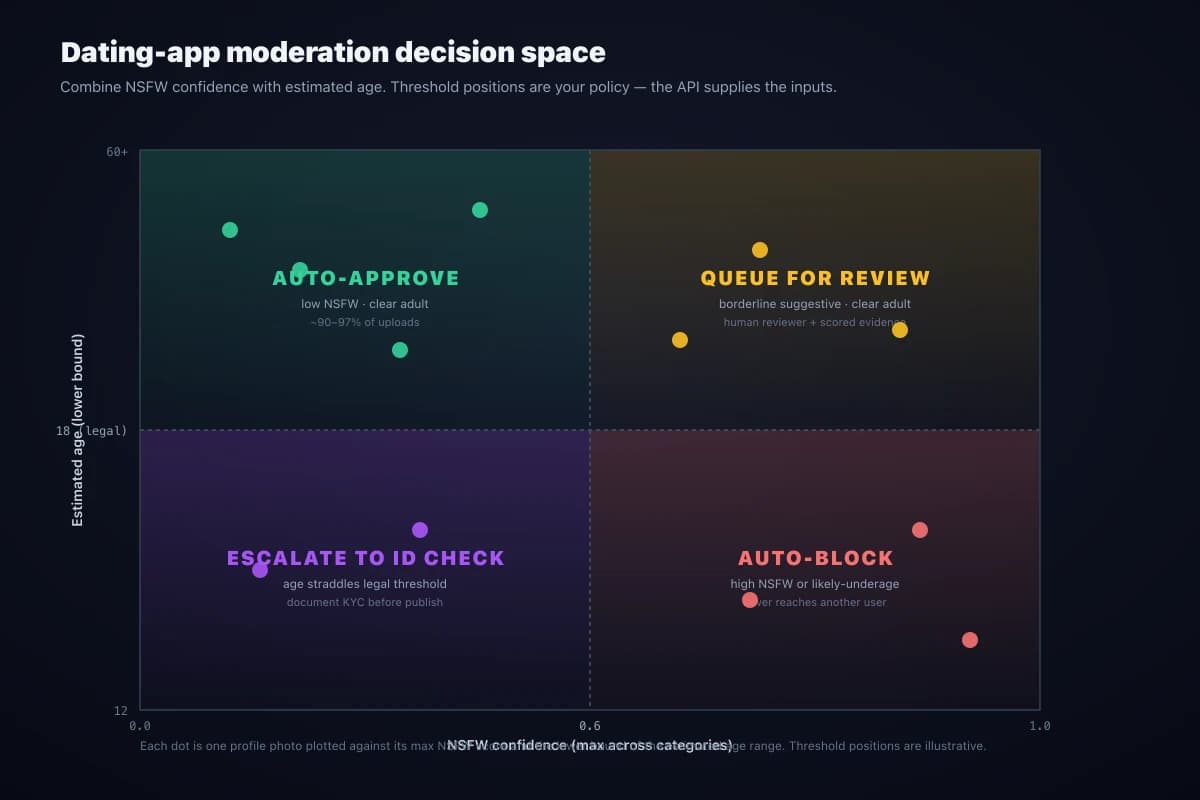
Sensible starting points for an 18-plus dating app: auto-block Nudity and Sexual Activity above 0.9, queue between 0.3 and 0.9, and auto-approve below 0.3. For age, auto-block when the upper bound is clearly under 18, escalate to an ID check when the range straddles 18 with a few years of margin, and auto-approve when the lower bound sits comfortably above 18. Track the four buckets weekly and shift thresholds if reviewers are overwhelmed or if too many obviously-borderline photos slip through.
GDPR, biometric data, and age estimation
Estimating age from a face is biometric-adjacent processing under the GDPR. Even though the API does not store a permanent face template, regulators in the EU have consistently treated automated inferences from a face — age, emotion, demographic guesses — as falling inside the scope that requires a lawful basis and, in many cases, a data protection impact assessment. The same rule of thumb applies under the UK GDPR and several US state privacy laws.
The practical pattern for a dating app is straightforward. Ask for explicit consent at sign-up before any biometric-adjacent inference runs, explain in plain language what the photo will be used for, send the photo to the API, read the moderation flags and the age range, make the publish decision, and discard the image. Persist only what an audit genuinely requires — the decision, the reason code, and a coarse age bucket if you need it for trust-and-safety analytics — not the raw photo or an exact predicted age tied to the user record. This is general information, not legal advice; confirm the specifics for your jurisdiction with qualified counsel.
The same data-minimisation pattern is described in detail on the age detection API page if you want a deeper look at the biometric side of the pipeline.
When to auto-approve, queue, block, or escalate
- Auto-approve when every NSFW category sits below its low threshold and the estimated age range's lower bound is comfortably above your platform's minimum age. This is the safe majority of profile photos and should never wait for a human reviewer.
- Queue for human review on borderline suggestive content, on no-face uploads, or on any combination of signals that your policy flags as ambiguous. The reviewer sees the scored evidence next to the image, which makes decisions faster and more consistent across the team.
- Auto-block on high-confidence nudity, sexual activity, weapons, or graphic violence, and on age estimates whose upper bound is clearly below the legal minimum for your platform. These photos must never reach another user; the cost of a rare false positive is far smaller than the cost of a single confirmed violation.
- Escalate to ID verification when the estimated age range straddles your minimum-age threshold within a few years either side. Photo age estimation is an age-assurance signal, not a legal identity check — pair it with a document-based step only on the cases where you cannot make a confident decision on the photo alone.
Operational practices that matter on a dating app
A few non-API patterns turn a working integration into a defensible trust-and-safety operation. Run the moderation API on every photo a user adds or replaces — not just the first one at sign-up — because abusers commonly try to slip a banned photo in under an existing approved account. Store the moderation scores and the age range alongside each profile photo for the lifetime of the moderation decision; that is the audit trail your team needs for appeals, regulator queries, and re-reviews if you change a threshold.
Build an appeals path for blocked photos that puts the case in front of a trained human reviewer with the scored evidence visible. Automated triage at this volume is accurate but not perfect — swimwear, breastfeeding photos, classical-art-inspired poses, and medical imagery are all common false positives on Nudity, and heavy filters and unusual angles widen the honest age range. Treating the API as a triage layer rather than a final adjudicator is what keeps both your moderation throughput and your user trust intact.
Frequently asked questions
How do you moderate profile photos on a dating app?
Send every profile photo to a moderation API at upload time, before the photo becomes visible to other users. Pixicular's detect-moderation service returns nudity, sexual-activity, suggestive, violence, and drug-use confidence scores; detect-age returns an estimated age range per detected face. Your backend compares those scores against per-category thresholds and routes the photo to auto-approve, queue for human review, or auto-block — so the safe majority publish instantly and only ambiguous cases reach a reviewer.
Can age estimation from a selfie replace document-based ID verification on a dating app?
No. Photo age estimation is an age-assurance signal, not a legal identity check. It is well suited to catching likely-underage uploads at sign-up and routing borderline cases into stronger verification, but it does not replace document-based KYC where regulation or platform policy requires verified identity. The recommended pattern is to clear obvious-adult ranges automatically, hard-block obvious-minor ranges, and escalate the band that straddles 18 to a document check before the profile goes live.
What about GDPR — is running age estimation on a user photo lawful?
Estimating age from a face is biometric processing under the GDPR and similar regimes, so it needs a lawful basis and, in many cases, explicit user consent and a data protection impact assessment. The practical pattern for dating apps is data minimisation: ask consent at sign-up, send the photo, read the age range, make the gating decision, and discard the image. Store only the decision and a coarse bucket — not the raw photo or an exact predicted age. This is general information, not legal advice; confirm your obligations with qualified counsel.
What percentage of dating-app uploads can be auto-approved by an API?
The exact split depends on your community and thresholds, but a typical dating platform sees 90 to 97 percent of profile photos auto-approve when both moderation scores stay below the conservative thresholds and the estimated age range is comfortably above 18. The remaining 3 to 10 percent is the human-review queue: borderline suggestive or swimwear shots, photos with an age range straddling the legal threshold, and adversarial uploads. The API absorbs the volume; reviewers focus only on the cases that need judgement.
Can I call NSFW detection and age estimation in a single API request?
Yes. Pixicular's /detect endpoint accepts a comma-separated services parameter, so you can request detect-moderation and detect-age in the same multipart POST. The image is uploaded once and the response is one JSON document with one key per requested service. That keeps profile-upload latency low and bills one API call rather than two per photo.
Add NSFW plus age screening to your profile upload flow
The fastest way to evaluate Pixicular for dating-app moderation is to point a curl request at it with a real profile photo. Pick a plan on the pricing page and follow the API documentation for authentication and the full response schema for detect-moderation and detect-age.