
Insurance Claim Photo Analysis API
Turn photo evidence into structured JSON in one API call. Vehicle-part and damage labels, VIN and plate OCR, and content moderation signals for staged or manipulated scenes — built for insurtech triage, fraud scoring, and claims automation.
Published 2026-05-21
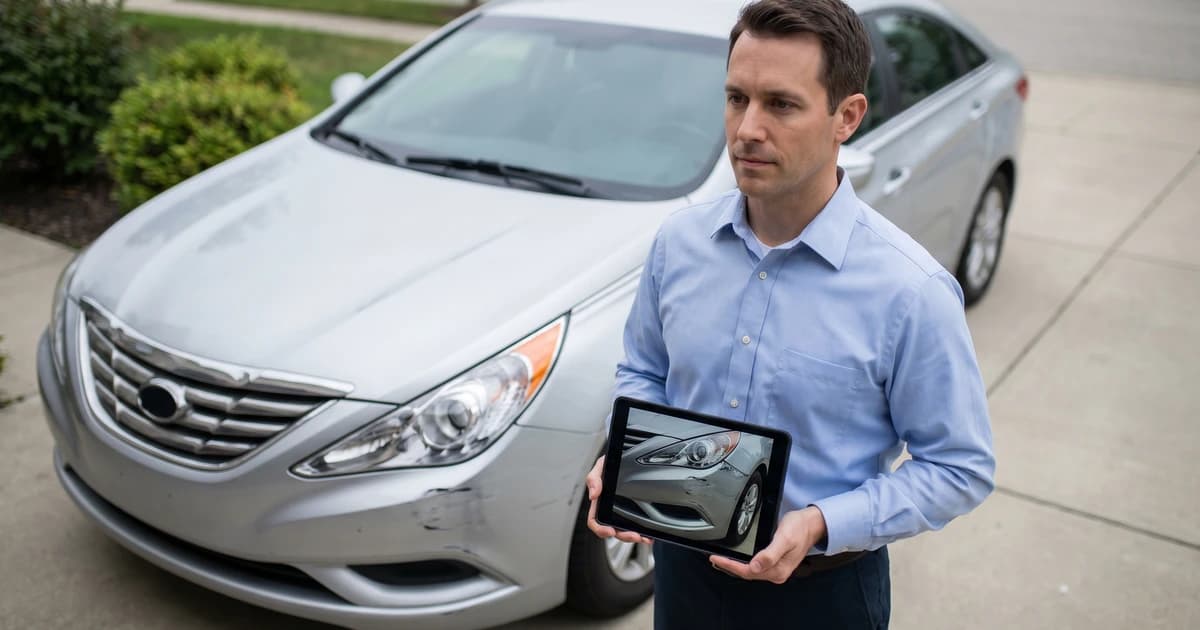
TL;DR. To analyse insurance claim photos with an API, POST each image to Pixicular's image analysis API and request detect-labels, detect-text, and detect-moderation in a single call. You get back one JSON document with damaged parts and damage types, extracted VINs, plates, and policy numbers, plus moderation and tamper signals — enough structure to triage the claim, score it for fraud risk, and route it to the right queue without an adjuster opening the image.
What the insurance claim photo analysis pipeline does
Claim photos arrive in volume, in mixed quality, and from channels the carrier does not fully control — policyholder smartphones, body-shop tablets, broker email forwards. A claims engine that opens each image manually does not scale. The Pixicular pipeline turns each photo into a structured record in a single round-trip so the rest of your system can reason about it as data rather than pixels.
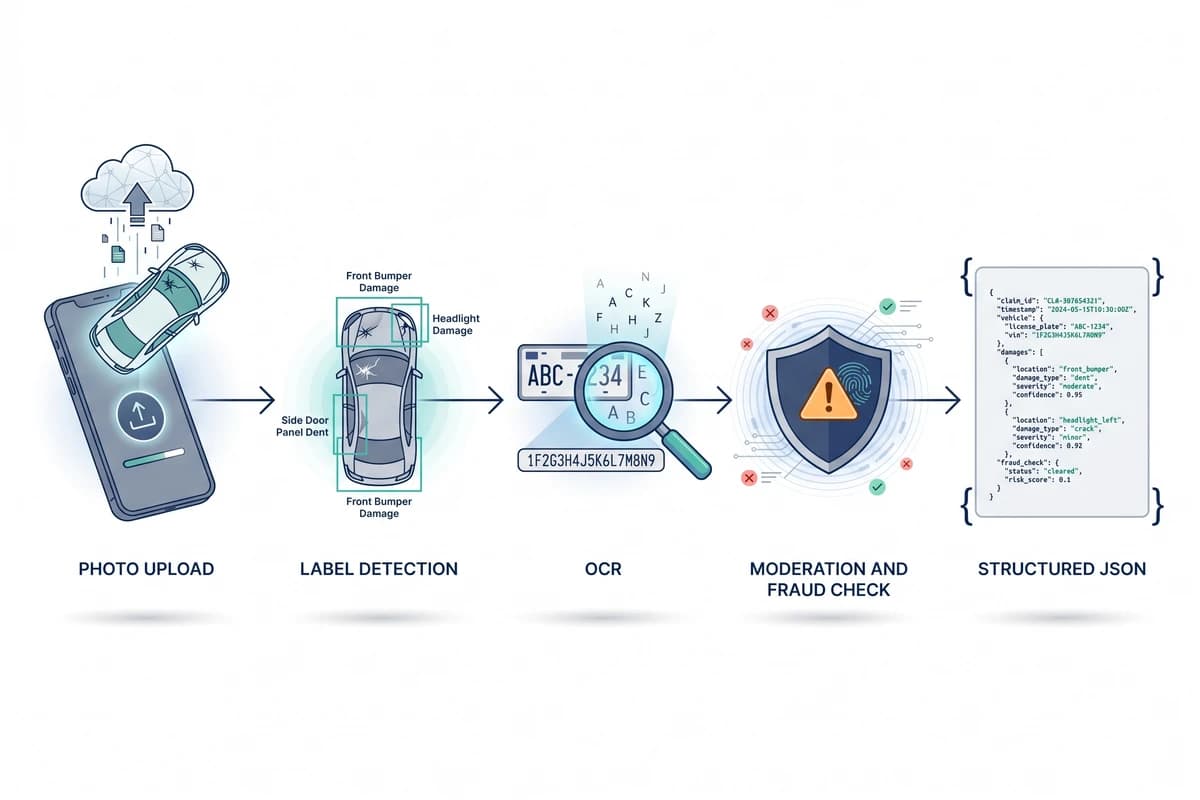
A typical insurance claim photo runs through four stages inside a single API call: image decoding and pre-processing, parallel analysis services (labels, OCR, moderation), light cross-service correlation, and JSON assembly. The same contract applies to first-notice-of-loss (FNOL) photos sent by the policyholder, to follow-up evidence uploaded by a repair shop, and to historical claim archives being analysed retrospectively for fraud patterns.
How does label detection identify damaged parts?
The detect-labels service returns recognised objects and conditions in the image with a confidence score and a normalised bounding box. For vehicle claims that means the parts themselves — bumper, fender, headlight, wing mirror, windscreen, wheel — together with damage indicators like dent, scratch, crack, shattered glass, deployed airbag, and burn marks. For property claims it covers structural elements (roof, ceiling, window) alongside condition labels (water stain, fire damage, broken glass, forced entry).
The bounding boxes let you highlight damaged regions directly in an adjuster UI without a second pass. The confidence values let your engine score severity: a high-confidence Dent overlapping a high-confidence Front Bumper is a strong, automatically-actionable signal; a low-confidence damage label routes to a human reviewer. For the underlying service in isolation, see the object and label detection API page.
How does OCR pull VIN, plate, and policy numbers from photos?
The detect-text service runs character recognition across the whole image and returns both a raw list of text blocks with bounding boxes and confidence scores, and — where it recognises the shape of the data — structured fields. On a vehicle claim that typically means the licence plate, the VIN from the dashboard or door jamb, and any policy or claim number printed on a paper FNOL form held next to the damage. On a property claim it covers visible address signage, receipt and invoice totals, and equipment serial numbers; on a personal injury claim it covers prescription labels, discharge text, and medical-receipt totals.
The structured fields are written back into the response under fields so your code reads result["detect-text"].fields.vin rather than hand-parsing regexes. Anything the parser cannot map stays in the rawText array with positional and confidence metadata, so you can fall back to your own field extraction without making a second API call. The same service powers the dedicated OCR API guide, which covers supported languages, character sets, and accuracy expectations in more depth.
How does moderation surface fraud and tampering signals?
The detect-moderation service was originally built for user-generated content platforms but maps neatly onto claim evidence. It returns category-level scores for content that should not auto-pass an adjuster review: graphic injury imagery, indications of staging (props that recur across claims, backdrops repeated from other submissions, mismatched lighting), and signals consistent with digital manipulation. These are not deterministic verdicts — no image-only API can prove fraud — but they are a useful first filter that flags claims for the special investigations unit instead of waving them through.
In a layered fraud-detection stack the moderation score sits alongside structured signals — policy history, telematics, prior-claim graph, third-party data — and contributes to a composite score. The defensible operating rule is the same as with any probabilistic detector: auto-approve only the clear cases, auto-deny none, and route everything in the uncertain middle to a human investigator with the labels, OCR fields, and moderation flags pre-attached to the case.
Example JSON response — vehicle damage claim photo
The response has a top-level key per requested service. For a single front-bumper damage photo with detect-labels, detect-text, and detect-moderation in the same call, you get back recognised parts and damage, the licence plate and VIN, and fraud-relevant moderation flags:
{
  "detect-labels": {
    "labels": [
      {
        "name": "Car",
        "confidence": 0.99,
        "boundingBox": { "x": 0.02, "y": 0.08, "width": 0.96, "height": 0.84 }
      },
      {
        "name": "Front Bumper",
        "confidence": 0.96,
        "boundingBox": { "x": 0.12, "y": 0.58, "width": 0.52, "height": 0.28 }
      },
      {
        "name": "Dent",
        "confidence": 0.92,
        "boundingBox": { "x": 0.22, "y": 0.62, "width": 0.18, "height": 0.14 }
      },
      {
        "name": "Headlight",
        "confidence": 0.95,
        "boundingBox": { "x": 0.18, "y": 0.40, "width": 0.16, "height": 0.12 }
      },
      {
        "name": "Cracked Glass",
        "confidence": 0.88,
        "boundingBox": { "x": 0.20, "y": 0.42, "width": 0.12, "height": 0.08 }
      }
    ]
  },
  "detect-text": {
    "fields": {
      "licencePlate": "ABC-1234",
      "vin": "1F2G3H4J5K6L7M8N9"
    },
    "rawText": [
      {
        "text": "ABC-1234",
        "boundingBox": { "x": 0.41, "y": 0.74, "width": 0.18, "height": 0.06 },
        "confidence": 0.97
      },
      {
        "text": "1F2G3H4J5K6L7M8N9",
        "boundingBox": { "x": 0.32, "y": 0.81, "width": 0.34, "height": 0.04 },
        "confidence": 0.94
      }
    ]
  },
  "detect-moderation": {
    "flags": [
      { "category": "Graphic Injury", "confidence": 0.02 },
      { "category": "Staged Scene Indicator", "confidence": 0.18 },
      { "category": "Digital Manipulation", "confidence": 0.06 }
    ]
  },
  "meta": {
    "processingTimeMs": 412,
    "requestId": "req_8c1a4d27"
  }
}
Bounding boxes are normalised to 0–1 against the original image dimensions so they work after any client-side resize. The full field catalogue, supported moderation categories, and error schema are documented in the API documentation.
Code: calling the API with a claim photo
Authentication is a bearer token in the Authorization header. Claim photos are uploaded as multipart/form-data; JPEG, PNG, and WebP are all accepted. Pass the services you want as a comma-separated list — the image is decoded once and analysed by each service in parallel, so a three-service call is meaningfully cheaper than three separate requests.
curl
curl -X POST https://api.pixicular.com/detect \
  -H "Authorization: Bearer $PIXICULAR_API_KEY" \
  -F "image=@./claim-photo-front-bumper.jpg" \
  -F "services=detect-labels,detect-text,detect-moderation"
Drop the call into your FNOL webhook or batch claim re-scan job; the same endpoint scales from one-off triage to back-catalogue analysis. See the pricing page for per-call and volume tiers.
Which claim types is the API designed for?
The same endpoint handles the three most common claim-evidence shapes. The services overlap in useful ways: a vehicle photo that also contains a paper FNOL form benefits from labels (to localise damage) and OCR (to read the policy number on the form) and moderation (to flag staging) in a single round-trip.
| Claim type | Label examples | OCR targets | Moderation role |
|---|---|---|---|
| Vehicle damage | Bumper, headlight, fender, windscreen, dent, scratch, crack, deployed airbag | VIN, licence plate, policy number on incident form | Flag staged scenes, duplicate backdrops across claims, graphic injury content |
| Property damage | Roof, ceiling, water stain, broken window, fire damage, fallen tree, forced entry | Address signage, invoice and receipt totals, serial numbers | Filter graphic content, flag inconsistent lighting and shadows that suggest compositing |
| Personal injury | Bandage, brace, crutch, hospital setting, prescription packaging | Prescription labels, discharge summary text, medical receipt totals | Gate explicit injury imagery before adjuster review; respect viewer-protection policies |
Where the API fits in a fraud-detection stack
Photo analysis is one input into a fraud score, not the verdict. Industry estimates of fraudulent claim spend run into the tens of billions annually across the major markets, and the bulk of it is opportunistic exaggeration rather than organised rings — both of which leave faint signals across many claims rather than one obvious tell. Per-image fraud detection by humans does not scale to that volume. An API that returns structured signals on every photo, at FNOL latency, lets you score every claim, not just the ones an adjuster happened to open.
The defensible architecture is layered: photo analysis feeds a composite fraud score together with policy-level features (tenure, prior claims, payment history), incident-level features (telematics, time-and-place of loss), and third-party data (DVLA / DMV records, weather at the incident location). The Pixicular API supplies the visual-evidence column of that table — damaged-part labels, extracted identifiers, moderation flags, and per-feature confidence scores. The rules that turn those signals into a referral are yours; the page on Pixicular's image analysis API covers the full service catalogue you can compose.
Privacy, retention, and adjuster workflow notes
Claim photos are personal data, and on personal-injury claims they can constitute special-category data under the GDPR and equivalent regimes. Apply data minimisation by default: send the photo, store the structured fields, and keep the raw image only for as long as your retention policy and regulator require. Persist the request ID and a hash of the original image against the claim record so audits can be reconstructed without warehousing the pixels indefinitely.
For adjuster UI, render the bounding boxes from detect-labels directly over the image so reviewers can see what the model saw, and surface the moderation flags as advisory chips rather than blocking modals. Auto-approve only on clear-positive label sets with low moderation scores; route everything else to the queue best equipped for it — desk adjuster, field inspector, or special investigations — with the structured response attached.
Frequently asked questions
How do you analyse insurance claim photos with an API?
POST each claim photo to Pixicular and request the services you need in one call — typically detect-labels for damaged parts and damage types, detect-text for VIN, licence plate, and policy numbers visible in the image, and detect-moderation for staging or tampering signals. The API returns a single JSON document with one key per service, ready to drop into your claims engine for triage, fraud scoring, and audit logging.
Can the API detect insurance fraud from photos alone?
Not on its own — and no API should claim to. Photo analysis surfaces useful fraud signals: inconsistent damage patterns versus the claimed incident, VINs or plates that mismatch the policy record, evidence of staging (props, repeated backdrops across claims), and metadata or content moderation flags that warrant a second look. These signals feed a fraud score that combines with policy history, telematics, and adjuster judgement. The API is a high-throughput first-layer filter that routes suspicious claims to a human investigator rather than rubber-stamping them.
What fields does the insurance claim photo analysis API return?
A single request returns one JSON document with a top-level key per requested service. detect-labels returns recognised objects (vehicle parts, damage indicators, environmental cues) with confidence scores. detect-text returns recognised text blocks and structured fields where present (VIN, licence plate, policy number, document dates). detect-moderation returns category-level scores for content that may indicate staging, manipulation, or graphic injury imagery. Each entry carries a normalised bounding box where applicable so you can highlight regions in your adjuster UI.
Can I analyse property and personal injury photos, not just vehicle damage?
Yes. The same endpoint handles vehicle damage, property damage (roofs, water damage, theft scenes), and personal injury photos. detect-labels recognises a broad set of objects and conditions; detect-moderation handles graphic content that should be gated before a human reviewer sees it; detect-text extracts whatever printed or handwritten text is visible — invoices, ID, prescription labels, receipts. The same JSON contract applies, so the same client code handles all three claim types.
How fast and how accurate is the analysis?
Typical single-image processing latency is in the few-hundred-millisecond range; multi-service calls add only marginal cost because the image is decoded once and routed to each service in parallel. Accuracy depends heavily on image quality: well-lit, in-focus photos taken close to the subject yield high-confidence label and OCR results, while blurry, dark, or extreme-angle photos degrade gracefully — confidence scores drop and your pipeline should route low-confidence claims to manual review rather than auto-approving them.
Wire claim photos straight into your claims engine
The fastest way to evaluate Pixicular against a real claim backlog is to POST a handful of representative FNOL photos and compare the JSON against your adjuster notes. Pick a plan on the pricing page, read the API documentation for authentication and field schema, and combine this guide with the underlying label detection and OCR service pages for deeper field-level detail.