
Face Emotion Detection API
Score seven emotions per face with one REST call — happy, sad, angry, surprised, neutral, disgusted, and fearful, returned as structured JSON for sentiment analytics, UX research, and engagement metrics.
Published 2026-05-21
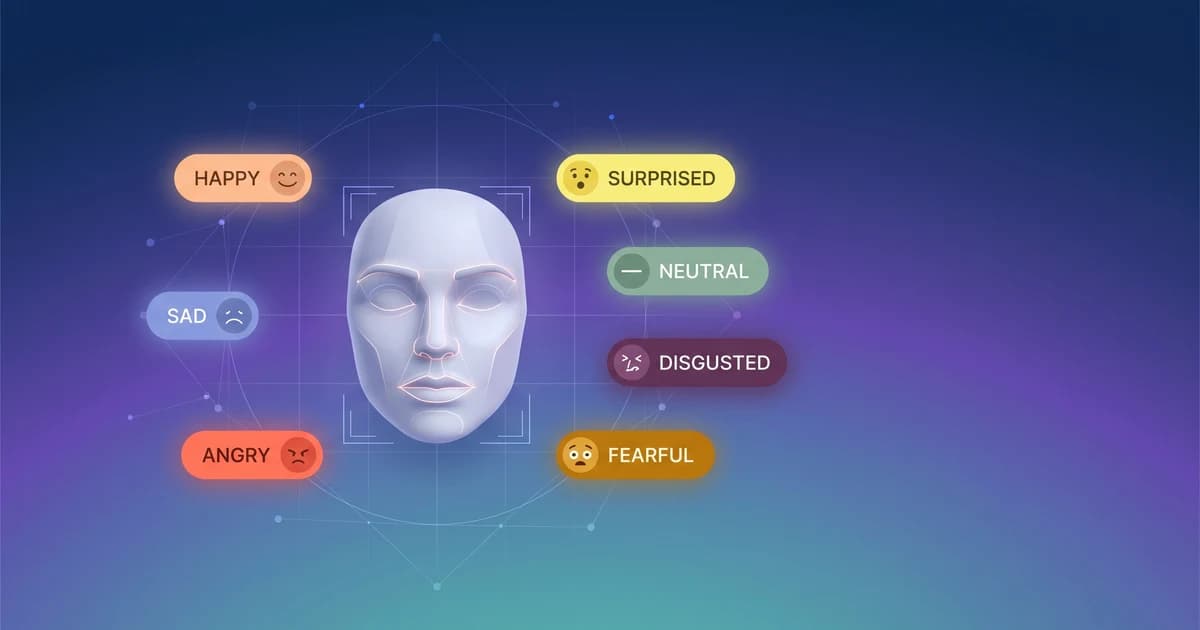
detect-face-emotions service returns structured JSON your application acts on.TL;DR. A face emotion detection API takes an image and returns, for every face it finds, a scored breakdown across seven emotions — happy, sad, angry, surprised, neutral, disgusted, and fearful — plus the top-ranked label and a confidence value. POST a photo to Pixicular's image analysis API with detect-face-emotions and your service reads the JSON to drive sentiment analytics, UX research, or engagement metrics in one call.
How does face emotion detection work?
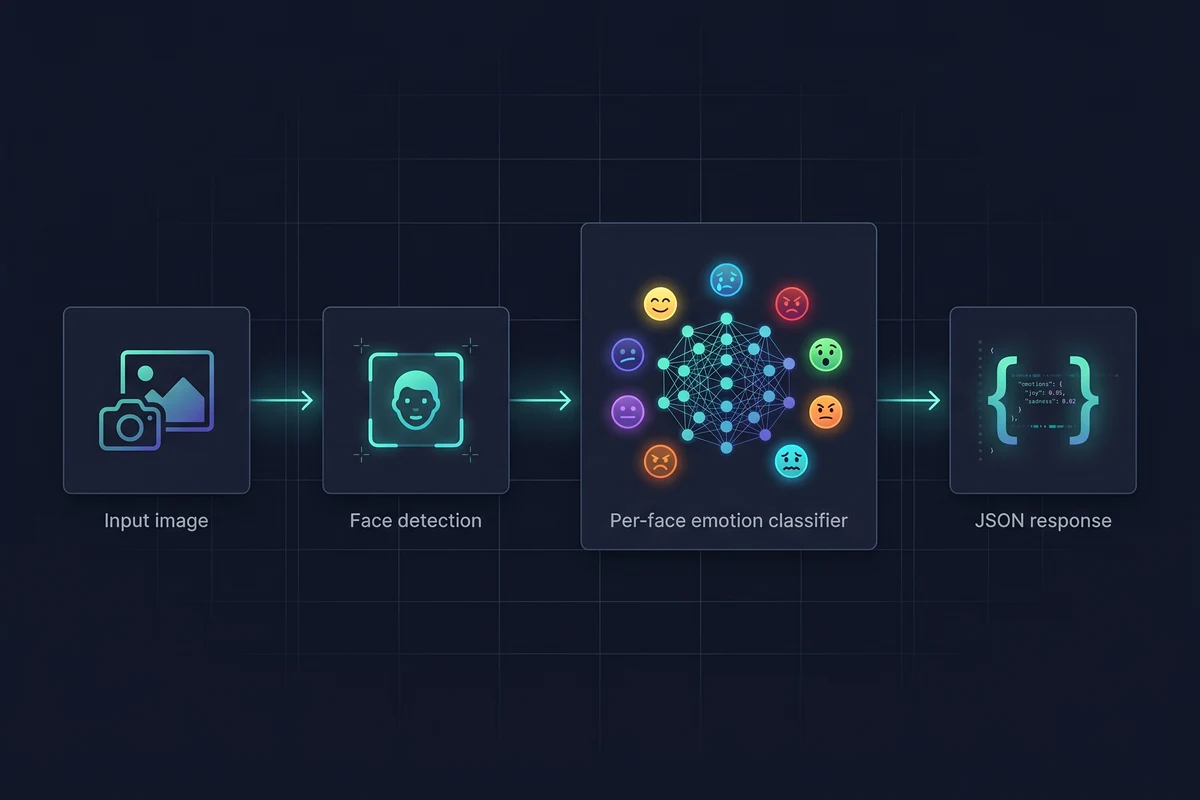
Emotion detection from a still image is a two-stage pipeline. First, a face detector locates every face in the frame and emits a bounding box for each one. Second, the cropped and aligned face is fed into an emotion classifier — a model trained on large, labelled facial expression datasets — that outputs a probability for each of the seven canonical emotions. The seven scores sum to roughly 1.0; the highest-scoring label is surfaced as the predicted emotion, and that label's score is exposed as the confidence.
The classifier reads facial action units — the small muscle movements that researchers like Ekman catalogued in the Facial Action Coding System: brow position, eyelid aperture, lip corners, nasolabial fold, jaw drop. None of that anatomy is exposed in the API surface. You send pixels, you read JSON. The model does the interpretation; your code decides what to do with it.
Which emotions can the API detect?
The classifier returns scores for the seven labels used across the bulk of the academic emotion-recognition literature. Each face in the response carries all seven scores in its scores object — you are not forced to use only the top label.
| Emotion | Typical facial cues | Where developers use it |
|---|---|---|
| Happy | Symmetric smile, raised cheeks, crow's-foot wrinkles at the outer eye | Engagement scoring, ad creative testing, customer satisfaction sampling |
| Sad | Inner brow raised, lip corners pulled down, drooping upper eyelids | UX research on friction points, audience-reaction analytics, well-being signals |
| Angry | Lowered, drawn-together brows, tight lips, tense jaw, hard glare | Trust & safety triage on profile photos, incident review on CCTV frames |
| Surprised | Raised brows, widely opened eyes, dropped jaw with parted lips | Ad creative impact testing, gameplay reaction tracking, UX delight signals |
| Neutral | Relaxed brow, mouth at rest, no strong muscular activation | Baseline state for change detection across video frames or A/B exposures |
| Disgusted | Wrinkled nose, raised upper lip, narrowed eyes | Product taste-test research, content reaction studies, packaging tests |
| Fearful | Raised, drawn-together brows, widened eyes, lips stretched horizontally | Safety analytics on public-space cameras, content moderation context, research |
For coarser sentiment buckets, group the seven labels into the shape your product needs — for example positive (happy, surprised), neutral (neutral), negative (sad, angry, disgusted, fearful) — at read time. The API does not commit you to that mapping; it just gives you the raw distribution.
What do the confidence scores actually mean?
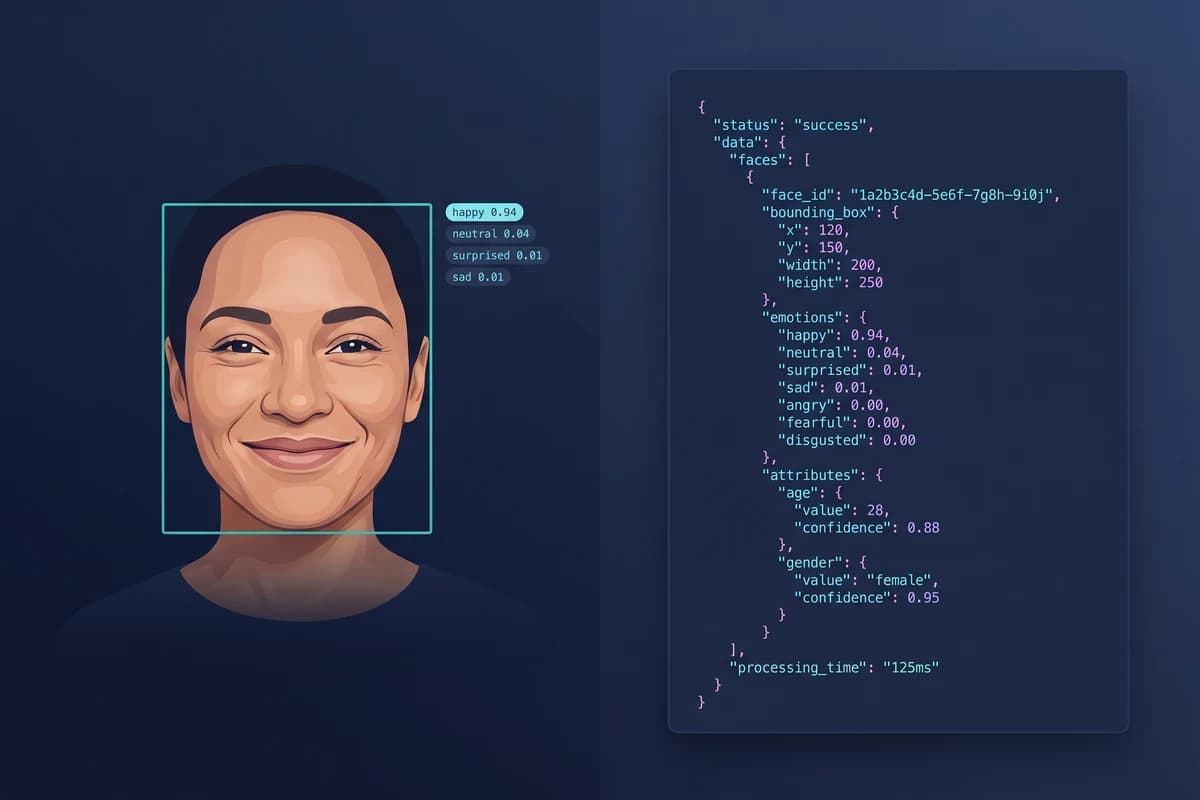
The scores object is a probability distribution across the seven emotions — values between 0 and 1 that sum to approximately 1.0. The top-level emotion field is the highest-scoring label and confidence is that score. A clean smile might land at happy: 0.94 with the other six emotions sharing the remaining 0.06 between them; an ambiguous expression might land at neutral: 0.38, happy: 0.31, surprised: 0.20 with the rest trailing.
Treat low confidence as a signal in itself: the face is hard to read, not that the model is silently failing. In practice that means thresholding rather than blindly taking the top label. For analytics — say a daily report on customer sentiment — ignore faces below a confidence floor. For individual decisions — say flagging a profile photo as "angry" — set a higher floor still and route uncertain faces to human review or combine with other signals.
How does the API handle multiple faces?
Every detected face becomes its own entry in the faces array. The contract is the same as for the single-face case: a normalised bounding box (so it survives any client-side resize), a top emotion, a full seven-emotion scores object, and a confidence value. Group photos, meeting frames, event stills, and CCTV captures all map onto the same shape.
From there you decide the aggregate. A UX research tool might average the seven scores across every face in a focus-group frame to produce a single "room sentiment" vector. An engagement tool might count distinct positive-leaning faces versus negative-leaning faces per minute of video. A trust & safety queue might surface only frames with at least one high-confidence angry or fearful face. The endpoint is the same; the rules are yours.
What is the JSON response format?
A request returns one JSON document with a top-level key per requested service. For detect-face-emotions, the value is a faces array; each entry carries boundingBox, emotion (the top label),scores (the full distribution across the seven labels), and confidence(the top label's score). A meta object at the top level carries the processing time in milliseconds and a request ID for log correlation.
{
  "detect-face-emotions": {
    "faces": [
      {
        "boundingBox": { "x": 0.18, "y": 0.22, "width": 0.16, "height": 0.28 },
        "emotion": "happy",
        "scores": {
          "happy": 0.94,
          "neutral": 0.04,
          "surprised": 0.01,
          "sad": 0.00,
          "angry": 0.00,
          "disgusted": 0.00,
          "fearful": 0.00
        },
        "confidence": 0.94
      },
      {
        "boundingBox": { "x": 0.52, "y": 0.20, "width": 0.15, "height": 0.27 },
        "emotion": "neutral",
        "scores": {
          "neutral": 0.71,
          "happy": 0.18,
          "sad": 0.06,
          "surprised": 0.03,
          "angry": 0.01,
          "disgusted": 0.01,
          "fearful": 0.00
        },
        "confidence": 0.71
      },
      {
        "boundingBox": { "x": 0.78, "y": 0.24, "width": 0.14, "height": 0.26 },
        "emotion": "surprised",
        "scores": {
          "surprised": 0.62,
          "happy": 0.22,
          "neutral": 0.10,
          "fearful": 0.04,
          "sad": 0.01,
          "angry": 0.01,
          "disgusted": 0.00
        },
        "confidence": 0.62
      }
    ]
  },
  "meta": {
    "processingTimeMs": 387,
    "requestId": "req_4f1c9d22"
  }
}
Bounding boxes are normalised to 0–1 against the original image dimensions so they survive any client-side resize. The full field catalogue, error schema, and combined multi-service response shape are documented in the API documentation.
Code: calling the face emotion detection API
Authentication is a bearer token in the Authorization header. Images are uploaded as multipart/form-data; JPEG, PNG, and WebP are all accepted. Pass the service you want in the services field — you can request detect-face-emotions on its own, or alongside detect-age and other services in a single call, since the image is decoded once and routed to each service in parallel.
curl
curl -X POST https://api.pixicular.com/detect \
  -H "Authorization: Bearer $PIXICULAR_API_KEY" \
  -F "image=@./meeting-frame.jpg" \
  -F "services=detect-face-emotions"
TypeScript — aggregate a room sentiment signal
// Aggregate emotion signals across every face in an image.
async function summariseEmotions(file: Blob) {
  const body = new FormData();
  body.append("image", file);
  body.append("services", "detect-face-emotions");

  const res = await fetch("https://api.pixicular.com/detect", {
    method: "POST",
    headers: { Authorization: `Bearer ${process.env.PIXICULAR_API_KEY}` },
    body,
  });
  const result = await res.json();

  const faces = result["detect-face-emotions"]?.faces ?? [];
  if (faces.length === 0) return { faces: 0, dominant: null };

  // Average each emotion score across faces — a coarse engagement signal.
  const totals: Record<string, number> = {};
  for (const f of faces) {
    for (const [emotion, score] of Object.entries(f.scores as Record<string, number>)) {
      totals[emotion] = (totals[emotion] ?? 0) + score;
    }
  }
  const dominant = Object.entries(totals).sort((a, b) => b[1] - a[1])[0][0];
  return { faces: faces.length, dominant };
}
The aggregation rule is policy you own. Average, vote, weight by face area, drop low-confidence faces — the API gives you the per-face distribution and your service composes it. See the pricing page for per-call and volume tiers.
Where the API fits in a developer stack
Three audiences pull the emotion service most often. Teams building sentiment analytics on user-generated content — ad creative testing, reaction reels, product review videos — use it to convert frames into a numeric signal they can chart. Teams building HR or employee-engagement tools use it sparingly and with consent (more on that below) to take coarse readings of meeting tone or training-content reception. UX research platforms use it during moderated and unmoderated studies to tag clip segments where the participant laughed, frowned, or looked confused, so researchers can jump to those moments instead of re-watching the full session.
Emotion detection composes naturally with the other services on Pixicular's image analysis API. Pair it with age estimation for demographic-segmented reaction reports, or with object and label detection to correlate emotion with what was on screen at the time — both in the same request.
Is it GDPR-compliant to detect emotions?
Facial emotion analysis processes biometric data under Article 9 of the GDPR, a special category that bars processing by default. To lift that prohibition you typically need a separate Article 9 condition — most commonly explicit, freely given, informed, and specific consent — on top of the standard Article 6 lawful basis. A Data Protection Impact Assessment (DPIA) is almost always required, data minimisation should be the operating default, and you need a clear, documented purpose limitation: emotion scores gathered for UX research should not quietly become inputs to a performance review.
The EU AI Act layers a further restriction on emotion recognition in workplaces and educational institutions: it is prohibited there except for safety or medical reasons. Outside those settings it is permitted but classified as a high-risk system in many use cases, which carries its own obligations. The pragmatic pattern is the same as for any biometric pipeline: send the image, take the decision, store only the aggregate you need (a bucket, a per-session average, an anonymised count), and discard the raw image. The API is the processor; you are the controller. Confirm your obligations with counsel and the API documentation before deploying emotion analytics in a regulated jurisdiction. This is general information, not legal advice.
Limits, edge cases, and how to design around them
Emotion classification is a noisy signal at the individual level. Cultural display rules vary — a smile can be polite rather than happy — and the seven-emotion taxonomy is itself a simplification. Accuracy degrades with extreme head pose, partial occlusion (masks, sunglasses, heavy fringes), low resolution, motion blur, harsh lighting, and beauty filters that smooth away the micro-expressions the classifier reads. Profile shots in particular yield wider, less confident distributions than front-facing portraits.
Design for the noise. Aggregate at population or session level where the errors average out. Threshold conservatively and treat the no-face case as a UX prompt ("could not detect a face — try a clearer photo") rather than a failure. Never rely on a single emotion score for a consequential decision about a single person — combine it with other evidence, escalate ambiguous cases, and document the policy alongside the model.
Frequently asked questions
How do you detect emotions from a face with an API?
POST an image to Pixicular and request the detect-face-emotions service. The API locates every face in the frame, runs an emotion classifier on each face, and returns one JSON object per face with seven scored emotions — happy, sad, angry, surprised, neutral, disgusted, fearful — plus the top-ranked label and a confidence score. Your application reads the structured response and applies its own thresholding and downstream logic.
Which emotions can the face emotion detection API recognise?
The classifier returns scores for the seven canonical emotions used across the academic literature: happy, sad, angry, surprised, neutral, disgusted, and fearful. Each face receives all seven scores in the same JSON response — the values sum to roughly 1.0, the highest-scoring label is surfaced as the top emotion, and that label's score is exposed as the confidence. You can ignore the lesser scores or use them as soft signals (a high neutral with a non-trivial sad score is a different state from a clean neutral).
How does the API handle multiple faces in one image?
Each detected face becomes its own entry in the faces array with a normalised bounding box, a scores object for all seven emotions, and the top-emotion label with confidence. Group photos, meeting screenshots, and CCTV frames work the same way — your code iterates the array and decides what to do with the aggregate, whether that is an average sentiment, the count of happy versus sad faces, or a per-seat engagement signal in a UX research session.
Is it GDPR-compliant to detect emotions from facial images?
Facial emotion analysis processes biometric data under Article 9 of the GDPR — a special category that requires both a lawful basis and a separate Article 9 condition, typically explicit consent. You will normally also need a Data Protection Impact Assessment (DPIA), a clear retention policy with data minimisation by default, and a documented purpose limitation. The EU AI Act further restricts emotion recognition in workplace and educational settings except for safety or medical reasons. The API does not make the legal decisions for you — it returns the scores; you remain the controller for how they are used. This is general information, not legal advice.
How accurate is face emotion detection from a single photo?
Expressions are an external proxy for internal states, not a reading of them, so treat the score as a probabilistic signal rather than a verdict. On well-lit, front-facing photos with clearly expressive faces, the top emotion is usually correct and the confidence is high. Accuracy drops with extreme poses, partial occlusion, low resolution, heavy filters, ambiguous expressions, and culturally varied display rules. For analytics use cases the noise averages out at population level; for per-individual decisions, threshold conservatively, combine signals, and never rely on emotion scores alone for a consequential outcome.
Add face emotion detection to your pipeline
The fastest way to evaluate Pixicular for emotion analytics is to point a curl request at it with a handful of representative frames. Pick a plan on the pricing page, read the API documentation for authentication and the full response schema, and combine this service with age detection or object and label detection in the same call for richer per-frame analytics.