
UGC Image Moderation for Social Platforms
Pre-publish scanning, post-publish sweeps, and an appeals workflow for user-generated content. Content moderation plus label detection, structured JSON back from one API call.
Published 2026-05-20

TL;DR. To moderate user-uploaded images at scale, route every upload through Pixicular's image analysis API with detect-moderation and detect-labels in one call. Your backend auto-approves the safe majority, blocks high-confidence unsafe content, and queues the borderline middle for a human reviewer — with a periodic post-publish sweep and a clear appeals path on top.
What is UGC image moderation?
User-generated-content (UGC) image moderation is the process by which a social platform decides whether an image submitted by a user is allowed to appear, stay, or be removed. It is the entire pipeline that sits between a user pressing "post" and other users seeing the image. On a platform of any meaningful size, that pipeline cannot be operated by human reviewers alone — the upload volume is too high, the latency expectations are too tight, and the unsafe minority is dangerous enough that every minute it spends in circulation matters. Automated detection at the API layer is the only sustainable way to keep up.
The job has three distinct phases. Pre-publish scanning runs the moment an upload is submitted and decides whether the image is allowed into the feed at all. Post-publish scanning re-checks already-live content when policy changes, when a user is reported, or when an improved model becomes available. Appeals handle the inevitable false positives and give users a human-reviewable path back into the feed. A good moderation product does all three and writes structured evidence to an audit log at each step.
Pixicular sits in the detection slot of this pipeline. The API returns scored moderation flags and detected labels; your code applies platform policy, holds the audit trail, and routes the borderline cases to human reviewers. The decision is always yours — the API supplies inputs, not verdicts.
How does the pre-publish moderation pipeline work?
The pre-publish pipeline has four stages. First, the user submits an image as part of a post. Second, your backend sends the image to the moderation API alongside the post metadata, requesting both moderation and label detection in a single call. Third, the API returns confidence scores per category and a list of detected labels in one JSON document. Fourth, your code applies thresholds against those scores and routes the image to one of three outcomes: auto-approve into the feed, queue for human review, or auto-block before the post is ever visible.
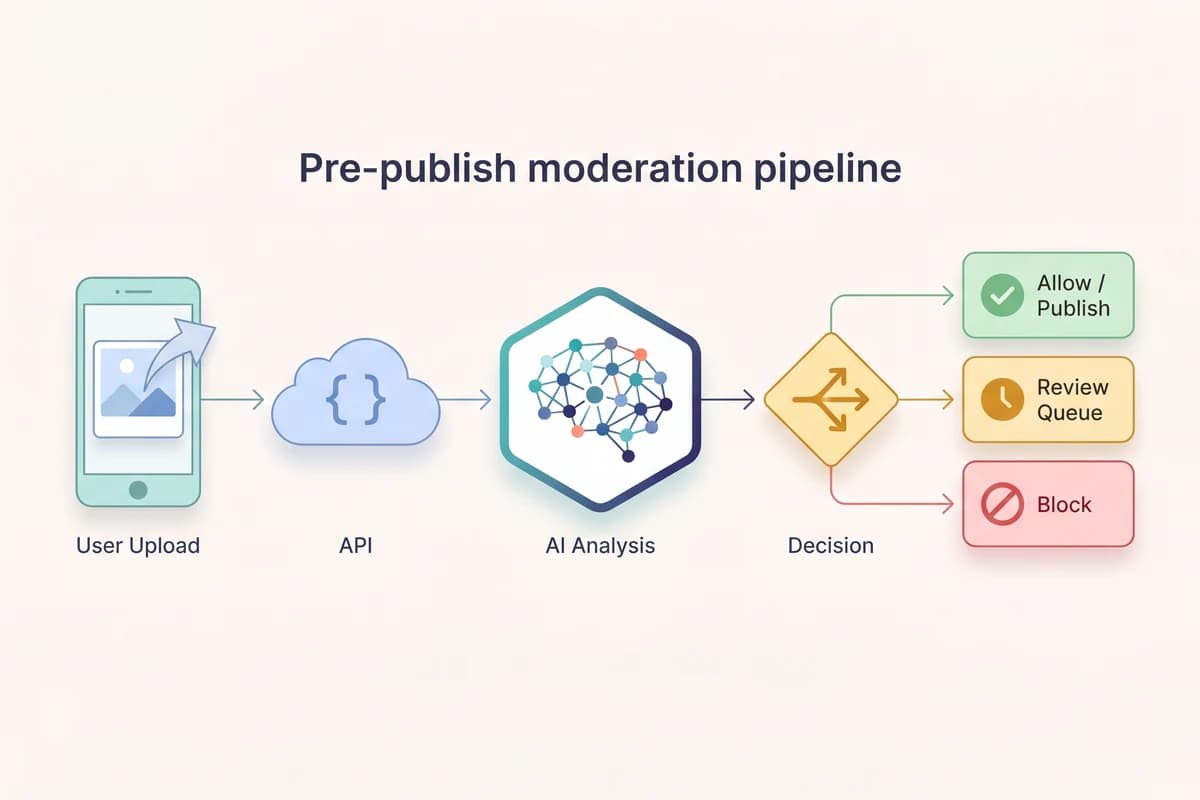
Latency matters in this loop. Users expect post creation to feel instant, and a slow moderation step shows up directly as a hang in the upload UI. Two patterns help: keep the API call to a single round-trip (Pixicular bundles moderation and labels into one request specifically for this reason), and run the call in parallel with any other backend work the post requires — thumbnailing, EXIF stripping, S3 upload — rather than in series.
How do you decide what to auto-approve, queue, and block?
The moderation API returns continuous confidence scores between 0.0 and 1.0 per category. Turning those into actions is a policy mapping: a low cutoff below which the image is auto-approved, a high cutoff above which it is auto-blocked, and the middle band that gets routed to a human reviewer. The wider the middle band, the more reviewer hours you spend and the fewer false positives reach users. The exact cutoffs depend on your community, your review capacity, and your regulatory exposure.
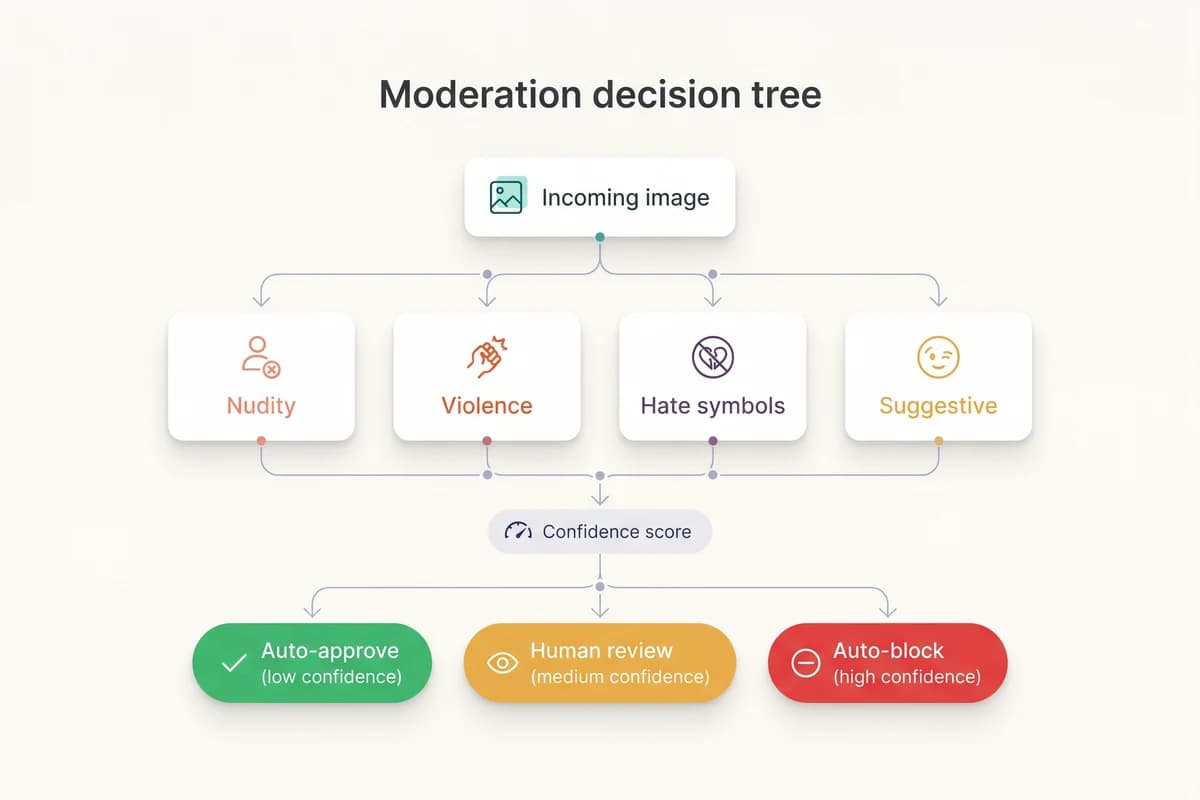
Sensible starting points for an 18-plus general-audience social platform are: auto- block Nudity, Sexual Activity, and graphic Violence above 0.9; queue between 0.5 and 0.9; auto-approve below 0.5. Use a lower auto-block threshold for stricter platforms and a higher one for permissive ones. Tune per category independently — a 0.5 on Suggestive is not the same risk as a 0.5 on Sexual Activity. Track the volume that lands in each bucket weekly and shift thresholds if reviewers are overwhelmed or if too many borderline posts slip through.
Label detection acts as a useful cross-check. A photograph of a knife in a kitchen context might score low on Violence (no blood, no injury), but the detect-labels service will still surface a Knife label. If your platform policy prohibits weapons regardless of context, the label is the right signal to gate on. Combining the two services in one call gives your policy code two independent views of the same image for negligible extra latency.
Which Pixicular services should a social platform use?
Two services cover the core needs. The detect-moderation service returns category confidence scores for unsafe content; detect-labels returns the objects and scenes in the frame. Both can be requested in a single POST, so each image costs one API call rather than two and the response is one JSON document with one key per service.
| What you screen for | Pixicular service | Signal on a user upload |
|---|---|---|
| Explicit nudity | detect-moderation | Exposed genitalia, female breasts, or buttocks in a user post. Highest-priority auto-block on general-audience platforms. |
| Sexual activity | detect-moderation | Explicit sexual acts depicted between people. Scored separately from nudity so policy can act on the act rather than the bareness. |
| Suggestive imagery | detect-moderation | Provocative posing, lingerie, or swimwear-in-context. The borderline bucket most social platforms route to human review. |
| Graphic violence | detect-moderation | Blood, injury, fights in progress, or graphic harm. Auto-block at high confidence; queue at the middle band. |
| Drug imagery | detect-moderation | Illicit drugs, paraphernalia, or visible consumption. Many platforms allow medical context but block recreational depiction. |
| Weapons in frame | detect-labels | Firearm, knife, or weapon labels detected by the object model — useful as a cross-check when moderation scores are quiet. |
| Topical context | detect-labels | General object and scene labels (person, outdoor, cafe, sports) feed auto-tagging, search, and post-publish re-scans. |
Categories and labels are scored independently. A photo can score clean on every moderation category and still trip a prohibited-object label, or vice versa — make decisions per signal, not on a single combined score.
Code: scan a UGC upload with fetch
One multipart POST to /v1/detect uploads the image and requests both services in the same request. The response is a single JSON document your backend can map to an action.
JavaScript / TypeScript — moderation plus label cross-check
// Scan a user-uploaded image before it goes into a social feed.
// One request returns moderation category scores AND detected labels.
type ModerationFlag = { name: string; confidence: number };
type Label = { name: string; confidence: number };

type DetectResponse = {
  "detect-moderation"?: { flags: ModerationFlag[] };
  "detect-labels"?: { labels: Label[] };
  meta?: { processingTimeMs: number; requestId: string };
};

type Decision =
  | { action: "auto_approve" }
  | { action: "queue_for_review"; reason: string }
  | { action: "auto_block"; reason: string };

const BLOCK = 0.9;
const QUEUE = 0.5;
const PROHIBITED_LABELS = new Set([
  "Weapon",
  "Firearm",
  "Knife",
  "Drug Paraphernalia",
]);

export async function moderateUgcImage(file: Blob): Promise<Decision> {
  const body = new FormData();
  body.append("image", file);
  body.append("services", "detect-moderation,detect-labels");

  const res = await fetch("https://api.pixicular.com/v1/detect", {
    method: "POST",
    headers: { Authorization: `Bearer ${process.env.PIXICULAR_API_KEY}` },
    body,
  });
  if (!res.ok) {
    // Treat unanalysed uploads as conservative-queue, never silent-approve.
    return { action: "queue_for_review", reason: `api_error_${res.status}` };
  }

  const data = (await res.json()) as DetectResponse;
  const flags = Object.fromEntries(
    (data["detect-moderation"]?.flags ?? []).map((f) => [f.name, f.confidence]),
  );
  const labels = data["detect-labels"]?.labels ?? [];

  // 1. Hard-block at very-high confidence on the categories that always
  //    breach social-platform policy.
  if ((flags["Nudity"] ?? 0) >= BLOCK) {
    return { action: "auto_block", reason: "nudity" };
  }
  if ((flags["Sexual Activity"] ?? 0) >= BLOCK) {
    return { action: "auto_block", reason: "sexual_activity" };
  }
  if ((flags["Violence"] ?? 0) >= BLOCK) {
    return { action: "auto_block", reason: "violence" };
  }

  // 2. Cross-check labels — prohibited objects route to review even if
  //    the moderation scores are quiet (e.g. a firearm in neutral context).
  const prohibited = labels.find(
    (l) => PROHIBITED_LABELS.has(l.name) && l.confidence >= 0.7,
  );
  if (prohibited) {
    return { action: "queue_for_review", reason: `label:${prohibited.name}` };
  }

  // 3. Borderline moderation scores go to a human reviewer.
  for (const [category, score] of Object.entries(flags)) {
    if (score >= QUEUE) {
      return { action: "queue_for_review", reason: category.toLowerCase() };
    }
  }

  // 4. Everything cleared.
  return { action: "auto_approve" };
}
Every threshold in that function — the 0.9 block cutoff, the 0.5 queue cutoff, the 0.7 prohibited-label cutoff — is policy you own. Tune them per platform; track the volume in each bucket weekly and adjust to keep the review queue manageable.
Example response
{
  "detect-moderation": {
    "flags": [
      { "name": "Nudity", "confidence": 0.02 },
      { "name": "Sexual Activity", "confidence": 0.01 },
      { "name": "Suggestive", "confidence": 0.14 },
      { "name": "Violence", "confidence": 0.03 },
      { "name": "Drug Use", "confidence": 0.00 }
    ]
  },
  "detect-labels": {
    "labels": [
      { "name": "Person", "confidence": 0.98 },
      { "name": "Outdoor", "confidence": 0.91 },
      { "name": "Coffee Cup", "confidence": 0.77 },
      { "name": "Cafe", "confidence": 0.62 }
    ]
  },
  "meta": { "processingTimeMs": 412, "requestId": "req_e7c4f1" }
}
For the full request and response schema, authentication, error codes, and rate limits, see the Pixicular API documentation.
Why do you also need post-publish scanning?
Pre-publish scanning catches the unsafe content the model knows about at upload time. Post-publish scanning catches everything that changes after the post goes live: policy updates, model improvements, late-arriving user reports, and edge cases the live model missed. Without a post-publish layer, every threshold change is permanent — a stricter rule introduced today does nothing about content that was already on the platform yesterday.
The implementation is straightforward. Store the original moderation scores alongside each post when it publishes. When policy changes, re-run the queue logic against the stored scores in batch — no second API call needed — and surface anything that now falls into the queue or block band. When a user report arrives, re-call the API on the reported image; reports often surface content that scored just below the queue threshold at upload time. When you upgrade to a newer model, schedule a sweep of recent uploads to catch the cases the previous version missed.
Pair this with a daily reviewer dashboard that shows blocked-volume and overturn-rate per category. Spikes in either are signals worth investigating — a sudden spike in Nudity blocks often means a brigading campaign, while a sudden spike in overturns usually means a model regression or a too-tight threshold.
How should an appeals workflow be built?
Appeals are the safety valve on a moderation pipeline. Even the best-tuned thresholds produce false positives — swimwear, breastfeeding, classical art, and medical imagery all score on Nudity at meaningful rates — and the cost of a wrongful block to an individual user is real. A working appeals workflow has four components.
- Clear reason codes. Surface a specific reason to the user when their image is blocked — "our systems flagged this image for nudity," not a generic "policy violation." The reason code is what makes the appeal actionable.
- A one-click appeal path. Friction here directly suppresses legitimate appeals. The appeal should be a single tap that opens a short form, not a 10-step support flow.
- Human review with the scored evidence visible. The reviewer should see the original moderation scores, the detected labels, and the policy that triggered the block, alongside the image itself. That context is what makes review fast and consistent across the team.
- Audit logging. Store the original API response, the policy decision, the appeal, and the human reviewer's outcome. That is the audit trail your team needs for regulator queries, threshold tuning, and future policy changes.
Track overturn rate per category as a first-class metric. A 30 percent overturn rate on Suggestive means the threshold is too tight and you are wasting reviewer hours and user trust. A 1 percent overturn rate on Nudity means the threshold is well calibrated. The numbers should feed back into policy reviews monthly.
Regulatory context: DSA, UK OSA, and proactive detection
Social platforms operating in the EU sit under the Digital Services Act (DSA). The DSA requires hosting and online-platform services to operate a notice-and-action mechanism for illegal content, publish transparency reports on moderation actions, provide an internal complaints handling system (the appeals workflow), and — for very large online platforms — conduct risk assessments and submit to independent audits. The DSA does not mandate automated detection, but it explicitly recognises automated tools as part of the moderation toolkit and requires platforms to disclose when automated systems are used.
In the UK, the Online Safety Act (OSA) places duties of care on user-to-user services to assess and mitigate risks from illegal content and, for services likely to be accessed by children, content harmful to children. Ofcom's codes of practice set out expectations including proactive technology measures for the most serious categories of illegal content. Both regimes place an emphasis on combining proactive detection with notice-and-action, appeals, transparency reporting, and clear terms.
An API like Pixicular sits in the proactive-detection slot. It is not a complete compliance solution — you still need the surrounding workflow, the audit log, the human review of appeals, and the transparency reporting — but it provides the scored evidence that the rest of the workflow depends on. This page is general information, not legal advice; confirm the specific obligations for your service with qualified counsel.
CSAM is out of scope for this API. If you are operating a service that may carry content involving minors, work with a specialist hotline (NCMEC in the US, IWF in the UK, or your national equivalent) and use a dedicated CSAM-detection tool — never rely on a general moderation API as the sole control for that risk.
Pricing and getting started
Pixicular pricing is per AI operation, not per image, and bundling two services into one request still counts as two operations against your monthly allowance — so a moderation-plus-labels integration consumes two operations per upload. Developer plan accounts include 1,000 free operations a month, which is enough to wire the integration end to end and run the threshold-tuning workflow on a small sample of real platform content before committing to a paid plan. The pricing page has the per-plan operation allowances and per-extra-operation rates.
Getting started is three steps: sign up, copy an API key, and point a fetch request at /v1/detect with a real upload from your platform. The API documentation covers authentication, the full response schema, rate limits, and error codes. For adjacent use cases see the guides on image moderation for marketplaces and the NSFW / nudity detection API.
Frequently asked questions
How do you moderate user-uploaded images at scale on a social platform?
Route every image upload through a content-moderation API at the moment it is submitted, before it is visible to other users. Pixicular's detect-moderation service returns confidence scores for nudity, sexual activity, suggestive, violence, and drug use, while detect-labels returns the objects and scenes in the frame. Your backend reads both, compares against per-category thresholds, and routes each upload to one of three outcomes: auto-approve, queue for human review, or auto-block. The safe majority publishes instantly with no human in the loop and reviewers see only the borderline cases the API flags.
What is the difference between pre-publish and post-publish image moderation?
Pre-publish moderation scans an image at upload time and blocks unsafe content before it appears in any feed. Post-publish moderation periodically re-scans content that is already live — for example, when policy changes, when a user is reported, or when a model is retrained — and removes items that no longer meet policy. Most social platforms run both: pre-publish handles the throughput and stops the obvious unsafe uploads instantly, while post-publish handles policy drift, late-arriving signals, and edge cases that the live model missed.
Does an API-based moderation pipeline satisfy DSA and UK Online Safety Act obligations?
Automated detection is a recognised part of the moderation toolkit under both the EU Digital Services Act and the UK Online Safety Act, but neither law treats an API as a complete compliance solution by itself. Both regimes require designated platforms to combine proactive detection with notice-and-action workflows, transparent moderation rules, an appeals mechanism, and (for the DSA) trusted-flagger handling. An image-moderation API like Pixicular is the proactive-detection layer; you still need the surrounding workflow, audit logging, and human review to meet the full obligation. This is general information, not legal advice.
How should an appeals workflow be designed for blocked or removed images?
Surface a clear reason code to the user when an image is blocked or removed, give them a one-click way to request a human review, store the original moderation scores and the decision in an audit log, and route the appeal to a trained reviewer who sees the scored evidence alongside the image. Track appeal volume, overturn rate, and median time-to-resolution per category. A high overturn rate on a single category is a signal that the threshold for that category is too aggressive and should be loosened.
Can a single API call return both content-moderation flags and image labels?
Yes. Pixicular's /v1/detect endpoint accepts a comma-separated services parameter, so you can request detect-moderation and detect-labels in the same multipart POST. The image is uploaded once and the response is one JSON document with one key per requested service. That keeps upload latency low and bills one API call per image rather than one per service.
Add UGC image moderation to your upload flow
The fastest way to evaluate Pixicular for social-platform moderation is to point a fetch request at it with a real upload from your platform. Pick a plan on the pricing page and follow the API documentation for authentication and the full response schema for detect-moderation and detect-labels.