
NSFW / Nudity Detection API
Score user-uploaded images for nudity, explicit sexual activity, suggestive content, violence, and drug use in a single REST call. Structured JSON back.
Published 2026-05-20

TL;DR. An NSFW / nudity detection API is a REST service that accepts an image and returns category confidence scores for unsafe content. Pixicular's image analysis API scores five categories — nudity, sexual activity, suggestive, violence, and drug use — with a 0.0 to 1.0 confidence per category, so your backend can auto-approve, queue, or auto-block per your policy.
How does NSFW detection work?
An NSFW detection API runs a trained image-classification model against the uploaded pixels and returns a confidence score for each moderation category the model was trained on. The score is a probability — a model output between 0.0 and 1.0 — that the image belongs to that category. Higher confidence means the model is more certain; lower confidence means the image is borderline or unrelated to that category. The API does not return a single "safe" or "unsafe" label, because that decision depends on platform policy, not on the model.
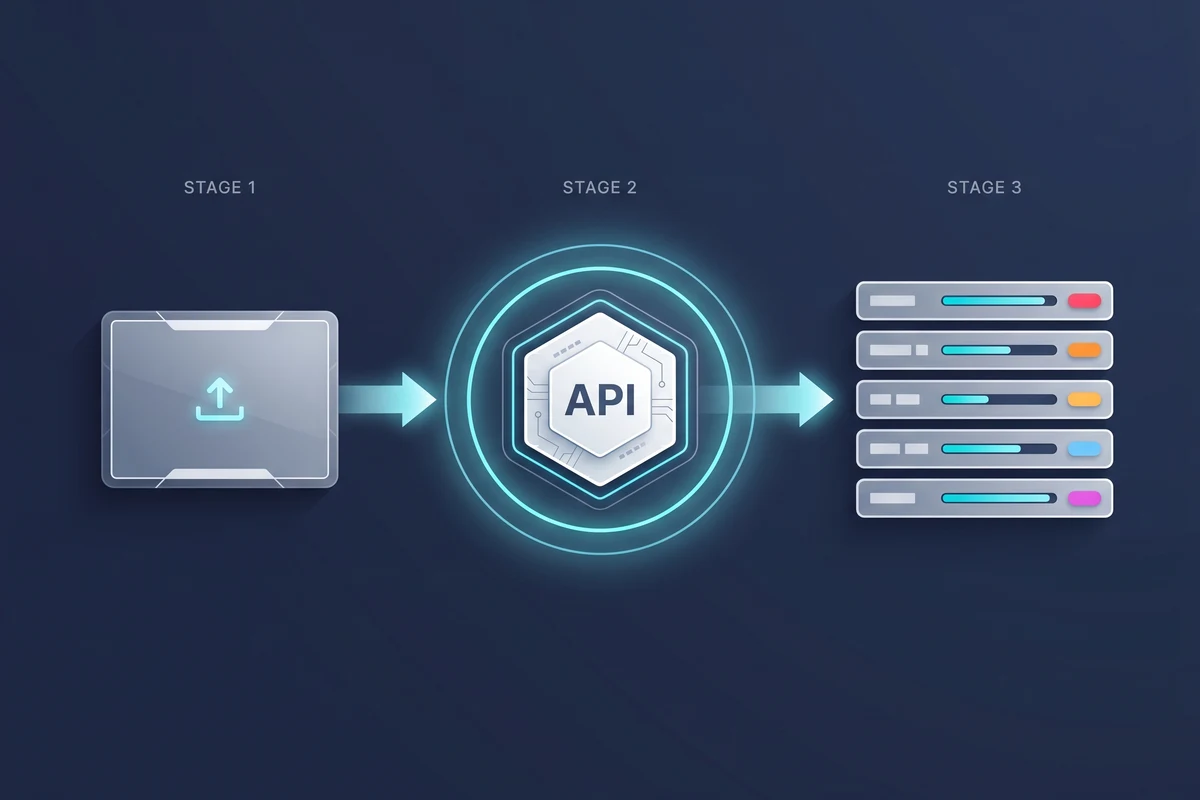
The integration is a single HTTPS request: your client uploads the image as multipart form data to the /detect endpoint, naming detect-moderation in the services list. The API responds with a JSON document keyed by service, with one array of category-and-confidence pairs inside. Your backend reads the scores and decides what to do.
What categories does the API return?
The detect-moderation service returns five categories. They are deliberately separated so your policy can treat each one differently — many platforms tolerate suggestive imagery but block nudity, or allow medical context but block recreational drug imagery.
| Category | What it covers | Typical policy use |
|---|---|---|
| Nudity | Exposed genitalia, female breasts, and buttocks. Includes partial nudity at lower confidence; full-frontal nudity scores highest. | Strict auto-block on consumer platforms; soft-block on dating and lifestyle apps. |
| Sexual Activity | Explicit sexual acts depicted between people, with or without nudity. Separate from the Nudity category so policies can target the act, not the bareness. | Auto-block at high confidence on every general-purpose platform. |
| Suggestive | Provocative posing, lingerie, swimwear-in-context, or sexually suggestive framing that is not nudity. The borderline bucket. | Queue for human review; thresholds vary by platform tolerance. |
| Violence | Visible weapons, fights in progress, blood, injury, or graphic harm. Includes both real and depicted violence at varying confidence. | Auto-block on graphic violence; queue on weapons-only or mild content. |
| Drug Use | Illicit drugs, drug paraphernalia, and visible drug consumption. Detects bongs, syringes, powders, pills in consumption context. | Queue for review; many platforms allow medical context but block recreational depiction. |
Categories are scored independently — an image can score high on Nudity and low on Sexual Activity (e.g. a topless portrait), or high on Violence and low on Nudity (e.g. a weapon photograph). Decisions should be made per category, not on a single combined score.
How do you use confidence thresholds for auto-block, review, and approve?
The API returns a continuous confidence score from 0.0 (model is highly certain the category is absent) to 1.0 (model is highly certain the category is present). Your policy turns those scores into actions by mapping ranges to three buckets: auto-approve at low confidence, queue for human review in the middle band, and auto-block at high confidence. Where you draw the boundaries depends on how risk-averse your platform is and how much human review capacity you have.
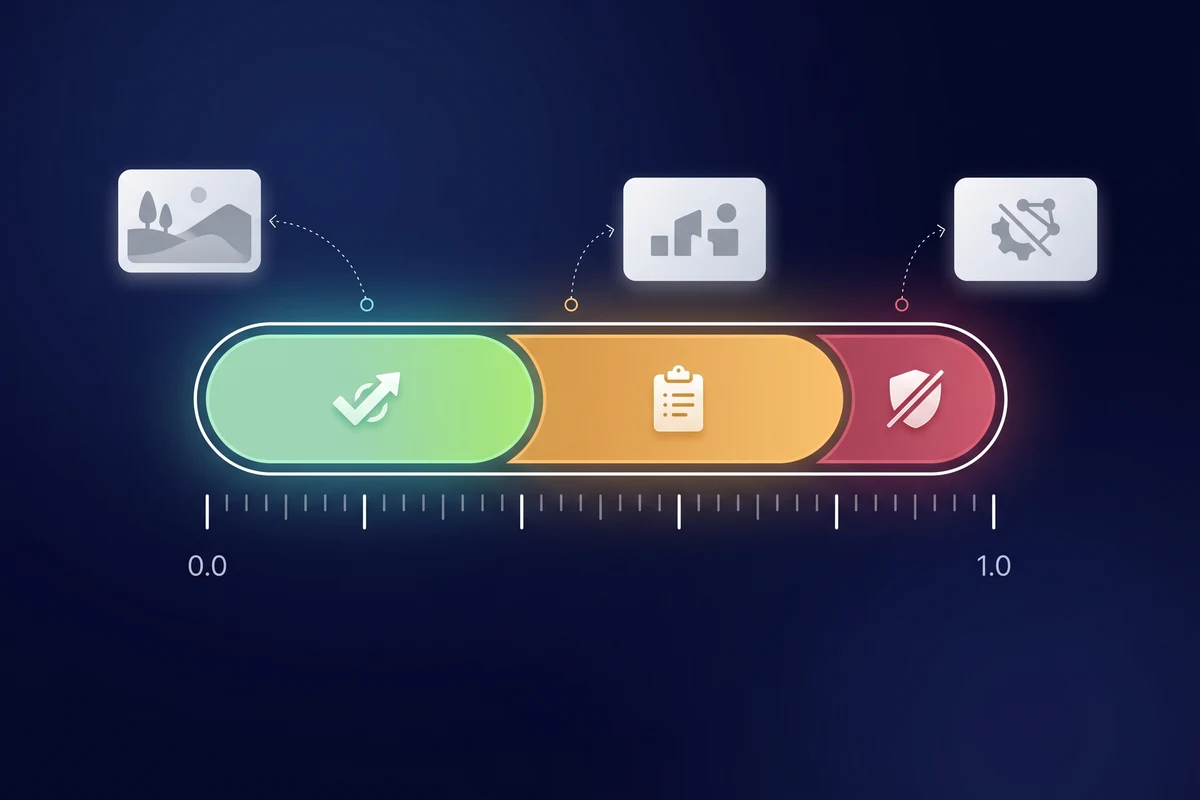
A sensible starting point is auto-approve below 0.3, queue between 0.3 and 0.85, and auto-block above 0.85 for high-risk categories like Nudity and Sexual Activity. Lower the auto-block threshold for stricter platforms — a children's service might auto-block above 0.6 — and raise it for more permissive ones. Tune thresholds per category independently: a 0.5 on Suggestive is not the same risk as a 0.5 on Sexual Activity. Track the volume each band receives over time and adjust to keep your review queue at a manageable size.
How do you call the NSFW detection API?
One multipart POST to /detect with the image file and the services parameter set to detect-moderation. The response is a single JSON document.
curl
curl -X POST https://api.pixicular.com/detect \
  -H "Authorization: Bearer $PIXICULAR_API_KEY" \
  -F "image=@./user-upload.jpg" \
  -F "services=detect-moderation"
Python (requests)
import os
import requests

API_URL = "https://api.pixicular.com/detect"
API_KEY = os.environ["PIXICULAR_API_KEY"]

with open("user-upload.jpg", "rb") as image_file:
    response = requests.post(
        API_URL,
        headers={"Authorization": f"Bearer {API_KEY}"},
        files={"image": image_file},
        data={"services": "detect-moderation"},
        timeout=30,
    )

response.raise_for_status()
result = response.json()

flags = {f["name"]: f["confidence"] for f in result["detect-moderation"]["flags"]}

# Apply your platform's thresholds
if flags.get("Nudity", 0) > 0.9 or flags.get("Sexual Activity", 0) > 0.9:
    decision = "auto-block"
elif any(score > 0.5 for score in flags.values()):
    decision = "queue-for-review"
else:
    decision = "auto-approve"

print(decision, flags)
Example response
{
  "detect-moderation": {
    "flags": [
      { "name": "Nudity", "confidence": 0.03 },
      { "name": "Sexual Activity", "confidence": 0.01 },
      { "name": "Suggestive", "confidence": 0.18 },
      { "name": "Violence", "confidence": 0.02 },
      { "name": "Drug Use", "confidence": 0.00 }
    ]
  }
}
For the complete request and response schema, authentication, error codes, and rate limits, see the Pixicular API documentation.
Which image formats and sizes are supported?
The API accepts the common upload formats clients produce. Maximum file size is 10 MB per image. Recommended dimensions are between 256 and 4096 pixels on the longest side — larger images are downscaled server-side without affecting moderation accuracy, and very small images (under 256 px) may produce lower-confidence scores because there are fewer pixels for the model to work with.
| Format | Notes and limitations |
|---|---|
| JPEG (.jpg, .jpeg) | Recommended for photographic uploads. Best size/quality trade-off for inference. |
| PNG (.png) | Supported. Larger payloads; useful when transparency or pixel-exact uploads matter. |
| WebP (.webp) | Supported. Smaller than JPEG at equivalent quality; preferred for modern client uploads. |
| GIF (.gif) | Supported. Only the first frame is analysed for static moderation; animated GIFs are not scanned frame-by-frame. |
| BMP (.bmp) | Supported. Uncommon in production uploads; consider transcoding to JPEG client-side. |
| HEIC (.heic, .heif) | Supported. iOS-default format; transcoded server-side before inference. |
Clients uploading from a browser should compress images larger than 4 MB before sending — the official Pixicular web SDK does this automatically. Video and multi-frame animation are out of scope for this service.
How accurate is automated nudity detection, and what about false positives?
Automated nudity detection is accurate enough to handle the safe majority of user uploads without a human reviewer in the loop, but it is not perfect and never claims to be. Common false positives include swimwear, breastfeeding photos, classical art, and medical imagery — all of which can score high on Nudity while being legitimate on many platforms. Common false negatives include heavily occluded content, unusual camera angles, low-resolution uploads, and adversarial cropping intended to evade detection.
The right way to handle this is to treat the API as an automated triage layer, not as a final adjudicator. Auto-approve at low confidence eliminates the volume of safe uploads from your review queue; auto-block at very high confidence keeps the obviously-unsafe items off your platform; and the middle band routes to human reviewers who see the scored evidence alongside the image. This hybrid pipeline is the industry standard for a reason — it gets you the throughput of automation with the judgement of human review on the cases that matter.
Responsible use: automated triage, not human judgement
An NSFW detection API is a triage tool. It scores pixels against a trained distribution; it does not understand consent, context, intent, or jurisdiction. A swimwear photo is not the same as a soft-core image even if both can score on the Nudity category. A weapon in a hunting context is not the same as a weapon in a threatening one even if both can score on Violence. The categories are signals, not verdicts.
For high-risk decisions — bans, account termination, regulatory takedowns, content that may involve minors — always route to a trained human reviewer. Store the moderation scores alongside the review decision so your team has an audit trail for appeals and for regulatory notices under the EU Digital Services Act or the UK Online Safety Act. If you are processing content that may involve minors or CSAM, work with a specialist hotline (NCMEC in the US, IWF in the UK, or your national equivalent) — this API is not a CSAM-detection tool and should never be used as the sole control for that risk.
Related Pixicular services
The NSFW detection capability is one service inside a broader image analysis API. Most moderation pipelines combine it with adjacent services in a single request — for example, age detection for platforms with age-gated content, or label detection for prohibited-goods screening. See use-case-specific guides for image moderation for dating apps and UGC image moderation for social platforms for end-to-end pipelines that compose moderation with the rest of the API.
Note: Pixicular's AI-generated image detection service is currently disabled while accuracy is being improved and is returning soon. The NSFW / nudity detection described on this page is a separate, live service and does not depend on AI-generation detection.
Frequently asked questions
What false-positive rate should I expect from an NSFW detection API?
False-positive rates depend entirely on the confidence threshold you set per category. A strict auto-block threshold above 0.9 keeps false positives low but lets borderline content through to a human review queue, while a threshold above 0.5 catches more unsafe imagery at the cost of more false positives on swimwear, medical imagery, and art. Pixicular returns a continuous 0.0 to 1.0 confidence score per category so you can tune the operating point for your platform and run the safe majority of uploads through auto-approve without a reviewer ever seeing them.
Is the Pixicular NSFW detection API GDPR-compliant?
Pixicular processes images on EU infrastructure and returns moderation scores without storing the original image beyond the request lifecycle by default. Image bytes are transmitted over TLS, processed for inference, and the response contains only category scores and labels — no biometric template is retained. You remain the data controller for the images you submit; Pixicular acts as a processor. This is general information, not legal advice. Confirm your specific data-residency and retention obligations with qualified counsel.
What regions and image languages does the NSFW detection API support?
The API is region-agnostic for image content — the underlying model has been trained on a globally diverse dataset and does not require a language hint. Visual moderation categories (nudity, sexual activity, suggestive, violence, drug use) are detected from pixels, not text, so the API works on user uploads from any locale. If you also need OCR or labels from the same image, request the detect-text or detect-labels service in the same call.
How long does Pixicular retain images submitted to the moderation API?
By default the original image is processed for inference and discarded; only the moderation scores and the timestamps of the request are retained for billing and audit. If you need a different retention policy — for example, longer retention on flagged images to support an appeals workflow — that is configurable on Business plans. Check the API documentation and your account settings for current defaults.
What happens when the API cannot analyse an image?
The API returns an explicit error response rather than a fabricated score when an image cannot be analysed — for example, an unsupported format, a file that exceeds the 10 MB limit, a corrupted upload, or a transient inference error. Your client should route these to a human review queue rather than treating the absence of a score as a pass. Treat unanalysed uploads as conservative-block by default, especially for high-risk categories.
Add NSFW detection to your upload pipeline
The fastest way to evaluate Pixicular's NSFW detection is to point a curl request at it with a real user upload from your platform. Pick a plan on the pricing page and follow the API documentation for authentication, error codes, and the full response schema for detect-moderation.