
Object & Label Detection API
Tag objects, scenes, activities, and concepts in any image with one REST call. The detect-labels service returns a ranked, scored list of labels as JSON — ready for image search, auto-tagging, and content discovery.
Published 2026-05-21
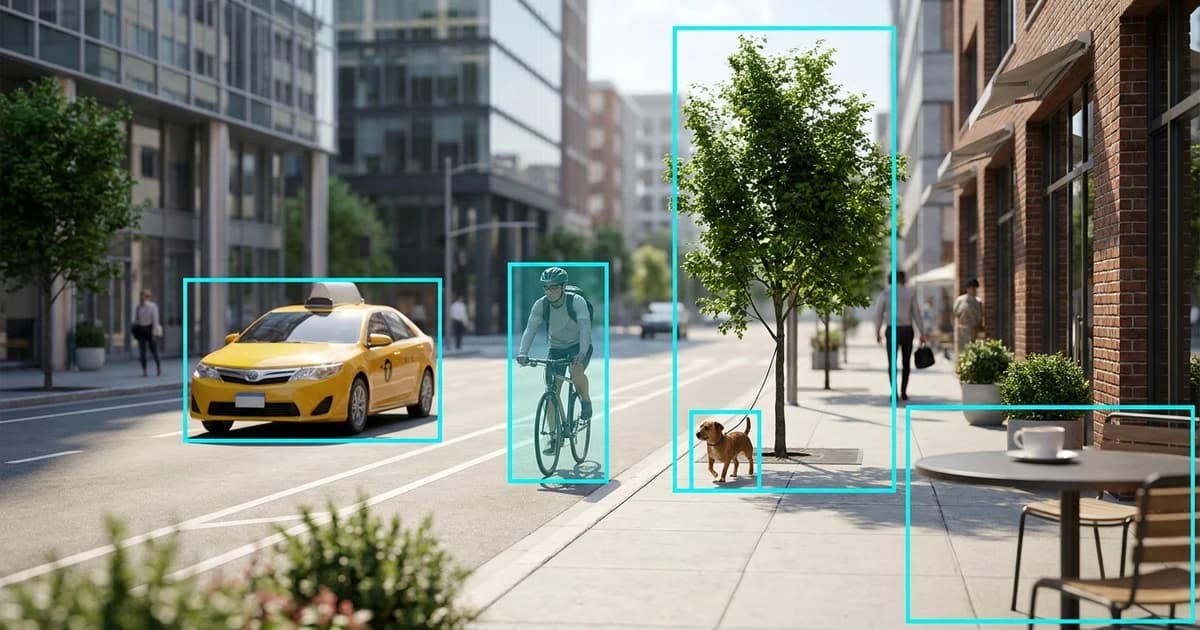
TL;DR. To detect objects in an image with an API, POST the image as multipart/form-data to Pixicular's image analysis API with services=detect-labels. The response is one JSON document with a ranked array of labels — each carrying a name, confidence score, parent taxonomy, and an optional bounding box for localised objects. One call, no SDK, structured JSON back.
How does object and label detection work?
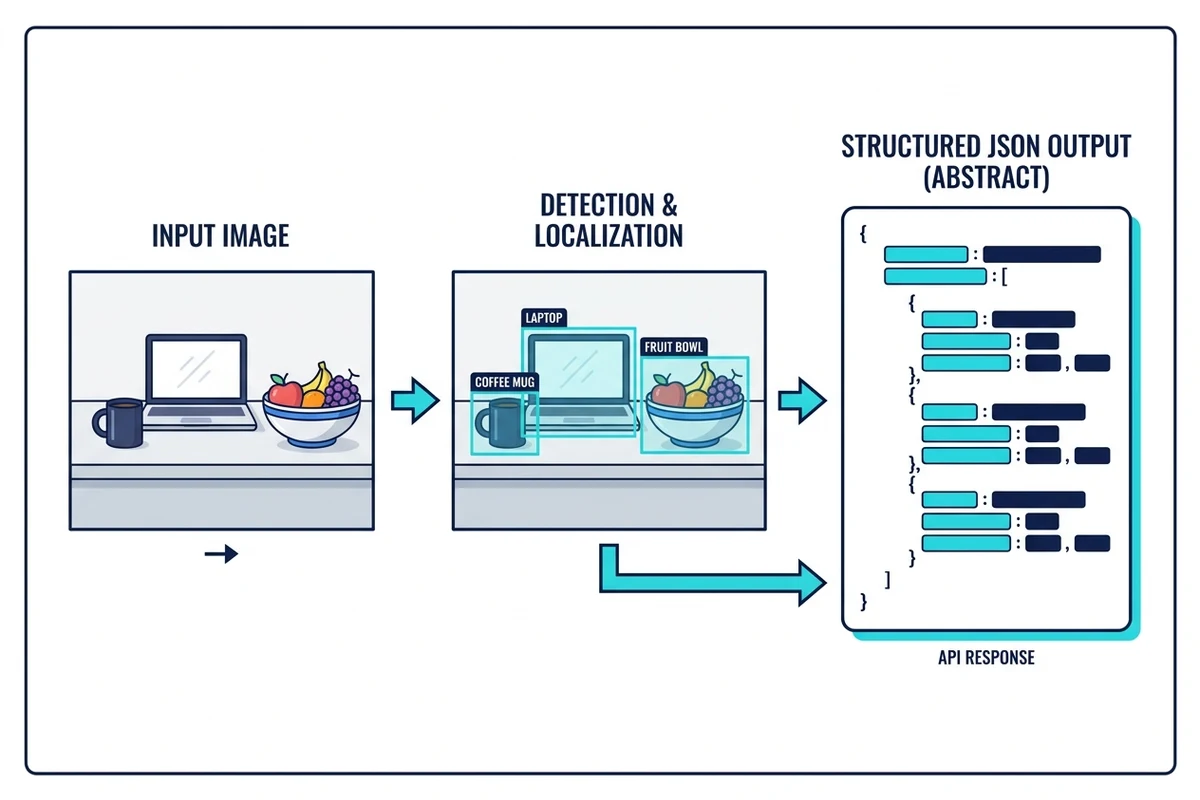
Label detection is the inverse of image search. Image search takes a label and finds matching images; label detection takes an image and returns the labels that describe it. Under the hood, the Pixicular detect-labels service runs a short pipeline on every upload: image decoding, a multi-label classifier that scores the frame against a broad taxonomy, an object detector that locates concrete things in the scene, and a final assembly step that bundles everything together into a ranked JSON response.
The output mixes three categories of label on purpose. Objects are the concrete things present in the image (taxi, bicycle, dog, coffee mug). Scenes describe where the photo was taken (city street, beach, kitchen). Activities and concepts describe what is happening or what the image conveys (cycling, cooking, sunset). A single photo can — and usually does — pick up labels from all three categories in the same response, which is what makes the service useful for search, recommendations, and discovery features rather than just literal object tagging.
What does the label detection API return?
A request returns one JSON document with a top-level key per requested service. For detect-labels the value contains a labels array sorted from highest to lowest confidence. Each entry carries the label name, a numeric confidence between 0 and 1, an optional parents array describing where the label sits in the taxonomy, and — when the label corresponds to a localised object — a normalised boundingBox expressed as fractions of the original image dimensions.
{
  "detect-labels": {
    "labels": [
      {
        "name": "Taxi",
        "confidence": 0.97,
        "parents": ["Vehicle", "Transportation"],
        "boundingBox": { "x": 0.12, "y": 0.42, "width": 0.28, "height": 0.32 }
      },
      {
        "name": "Bicycle",
        "confidence": 0.94,
        "parents": ["Vehicle", "Transportation"],
        "boundingBox": { "x": 0.41, "y": 0.38, "width": 0.14, "height": 0.40 }
      },
      {
        "name": "Dog",
        "confidence": 0.92,
        "parents": ["Animal", "Mammal"],
        "boundingBox": { "x": 0.66, "y": 0.66, "width": 0.07, "height": 0.12 }
      },
      {
        "name": "Tree",
        "confidence": 0.90,
        "parents": ["Plant", "Nature"]
      },
      {
        "name": "Outdoor",
        "confidence": 0.88,
        "parents": ["Scene"]
      },
      {
        "name": "City Street",
        "confidence": 0.86,
        "parents": ["Scene", "Urban"]
      },
      {
        "name": "Cycling",
        "confidence": 0.81,
        "parents": ["Activity", "Transportation"]
      }
    ]
  },
  "meta": {
    "processingTimeMs": 312,
    "requestId": "req_8a2c5f01"
  }
}
Bounding boxes are fractional (0–1) so they survive any client-side resize. The parents field is the hook for hierarchical search and faceted navigation — you can roll up "Taxi" into "Vehicle" into "Transportation" without storing the relationship yourself. The full field catalogue, error schema, and combined multi-service response shape are documented in the API documentation.
What kinds of labels can the API detect?
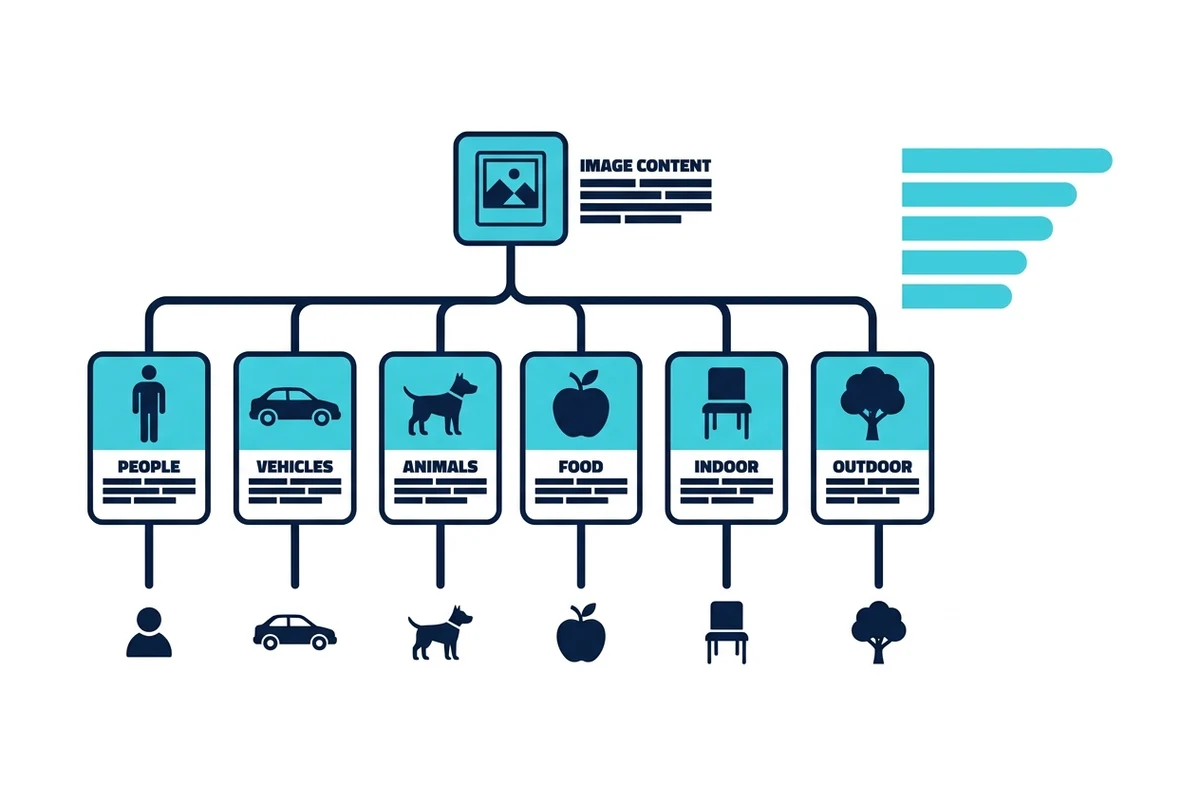
The taxonomy covers the categories most product teams reach for when building image search, auto-tagging, and content discovery. The table below lists 20 representative labels grouped by theme. It is a sample, not the complete vocabulary — the live taxonomy is broader and grows over time as new concepts are added.
| Theme | Example label | Where developers use it |
|---|---|---|
| Objects | Coffee Mug | Cafe and kitchen photography, lifestyle blogs, e-commerce stock |
| Objects | Laptop | Remote-work shots, product reviews, office stock libraries |
| People | Person | Group photos, portraits, crowd estimation in event coverage |
| People | Child | Family content, education imagery, age-aware moderation routing |
| Vehicles | Car | Classifieds, insurance claims, traffic and parking analytics |
| Vehicles | Bicycle | Mobility apps, sport content, urban-scene tagging |
| Animals | Dog | Pet marketplaces, social feeds, animal welfare datasets |
| Animals | Cat | Pet content, adoption sites, stock imagery libraries |
| Food | Pizza | Delivery apps, restaurant menus, recipe sites and UGC food feeds |
| Food | Coffee | Hospitality content, cafe directories, breakfast photography |
| Scenes | Beach | Travel sites, holiday-rental listings, lifestyle stock photography |
| Scenes | City Street | Urban analytics, location-aware content, street photography |
| Activities | Cycling | Sport and fitness apps, route content, event coverage |
| Activities | Cooking | Recipe platforms, home content, instructional video thumbnails |
| Nature | Mountain | Travel and adventure content, weather imagery, outdoor gear sites |
| Nature | Forest | Travel listings, environmental content, hiking and trail apps |
| Indoor | Living Room | Real-estate listings, furniture e-commerce, interior design feeds |
| Indoor | Kitchen | Real-estate photos, recipe content, appliance product imagery |
| Outdoor | Garden | Real-estate listings, gardening content, landscaping portfolios |
| Concepts | Sunset | Stock libraries, travel content, mood-based image search and filters |
What do the confidence scores actually mean?
Each label carries a confidence score between 0 and 1. It is the classifier's posterior probability that the label applies to the image — not a statistical guarantee, not a ground-truth score, and not a calibrated p-value across every possible image. Treat it as a ranking signal first and a decision input second. A label at 0.97 is the model telling you it is very sure; a label at 0.55 is the model telling you it is plausible but contested.
The pragmatic pattern is to define three bands rather than a single global threshold. Keep labels above 0.7 for display and search indexing. Treat labels between 0.5 and 0.7 as soft signals — useful for personalisation, related-content recommendations, or low-stakes filters, but not as primary tags. Drop anything below 0.5 for end-user display unless you specifically need a long tail of fallback hints. Persist the request ID so you can re-evaluate the original response when your thresholds change.
How do you call the label detection API?
Authentication is a bearer token in the Authorization header. Images upload as multipart/form-data; JPEG, PNG, and WebP are accepted up to 10 MB per request. Pass the service name in the services field, or a comma-separated list if you want labels alongside moderation, OCR, or other services in the same call.
curl
curl -X POST https://api.pixicular.com/detect \
  -H "Authorization: Bearer $PIXICULAR_API_KEY" \
  -F "image=@./street-scene.jpg" \
  -F "services=detect-labels"
TypeScript — typed auto-tagging with confidence thresholding
// Auto-tag an uploaded image with the Pixicular label detection API.
interface DetectedLabel {
  name: string;
  confidence: number;
  parents?: string[];
  boundingBox?: { x: number; y: number; width: number; height: number };
}

interface LabelResponse {
  "detect-labels": { labels: DetectedLabel[] };
  meta: { processingTimeMs: number; requestId: string };
}

async function tagImage(file: Blob): Promise<string[]> {
  const body = new FormData();
  body.append("image", file);
  body.append("services", "detect-labels");

  const res = await fetch("https://api.pixicular.com/detect", {
    method: "POST",
    headers: { Authorization: `Bearer ${process.env.PIXICULAR_API_KEY}` },
    body,
  });

  if (!res.ok) throw new Error(`Label detection failed: ${res.status}`);
  const data = (await res.json()) as LabelResponse;

  // Keep high-confidence labels for display; surface borderline ones for review.
  return data["detect-labels"].labels
    .filter((l) => l.confidence >= 0.7)
    .map((l) => l.name);
}
Combine detect-labels with other services for richer workflows — for example labels plus moderation on seller-uploaded photos, as covered in the e-commerce product moderation guide, or labels plus OCR on insurance claim photos in the insurance claim photo analysis guide. The image is decoded once and routed to each service in parallel.
Where the API fits in a developer stack
Three audiences reach for label detection most often. Teams building image search use labels as the index — every uploaded photo becomes a bag of weighted tags that a search query can match against directly, without any human curation step. Teams building auto-tagging on user-generated content use labels as a starter set of tags that the uploader can confirm or refine, cutting the cold-start cost of empty metadata. Teams building content discovery — for example a feed that surfaces recipe-like images to users who engaged with cooking content — use labels as the feature vector for downstream similarity and recommendation.
The service composes naturally with the other capabilities of Pixicular's image analysis API. Pair labels with content moderation flags for safety-aware tagging, with OCR text blocks for caption-and-keyword indexing, or with face emotion scores for mood-tagged discovery — all in the same request, with one billing line. See the pricing page for per-call and volume tiers.
Limits, edge cases, and what is not supported
The label model is general-purpose, which means it is wide but not deep. It will tell you that an image contains a dog with high confidence; it will not reliably tell you the exact breed, the dog's name, or that this is your dog specifically. It will recognise a car; it will not return the make, the model year, or the licence plate. It will detect a shop sign; it will not extract the text on the sign — that is the detect-text service's job, and the two compose in a single call.
A few categories are deliberately out of scope. Named individuals are not returned — the label model does not do celebrity recognition. Specific brand logos and exact product SKUs are not returned — for product catalogues, use labels alongside your own internal product database keyed by uploader context. Legally regulated categories such as medical diagnoses, named landmarks at street level, or fine-grained species identification on edge cases are also out of scope. For NSFW and explicit-content signals, request the detect-moderation service in the same call rather than trying to infer them from labels.
Accuracy degrades gracefully on harder inputs rather than failing silently. Extreme close-ups, heavy occlusion, motion blur, very low resolution, abstract or artistic compositions, and rare or visually ambiguous concepts all lower confidence scores. That is what the confidence field is for: design around the noise by thresholding rather than expecting the top label to always be correct.
Frequently asked questions
How do you detect objects in an image with an API?
POST the image as multipart/form-data to the Pixicular API and request the detect-labels service. The API decodes the image once, runs a multi-label classifier and an object detector across it, and returns a JSON document containing a ranked array of labels. Each label carries a name, a confidence score between 0 and 1, an optional parent category for taxonomy navigation, and — when the label corresponds to a localised object — a normalised bounding box. One request, one JSON response, no SDK required.
What does the label detection API return?
The response contains a labels array sorted from highest to lowest confidence. Every label has a name (for example coffee mug, beach, cycling, indoor), a confidence score, and an optional parents array describing where the label sits in the taxonomy. Localised objects also include a normalised boundingBox so you can highlight the detected region in your UI. A top-level meta object carries processingTimeMs and a requestId for log correlation.
How accurate is image label detection?
Common objects, mainstream scenes, and everyday activities routinely score above 0.85 confidence on clear, well-lit photos at adequate resolution. Confidence drops on heavily occluded objects, motion blur, extreme close-ups, abstract or artistic compositions, and visually rare concepts. The recommended pattern is to threshold on confidence — keep labels above 0.7 for display, between 0.5 and 0.7 for soft signals, and below 0.5 only as fallback hints — rather than relying on a flat keep-or-discard rule.
What is not supported by the object detection API?
The label model is general-purpose, so it does not identify named individuals, specific brand logos, exact product SKUs, or legally regulated categories like medical diagnoses. It also does not perform fine-grained species or breed identification on edge cases, and it will not return location-specific labels such as named landmarks at street level. For document text use detect-text instead; for explicit-content flags use detect-moderation; for per-face age estimates use detect-age. Combine multiple services in a single call when you need more than labels.
Can I request label detection together with other image services?
Yes. Pass a comma-separated list to the services field — for example services=detect-labels,detect-moderation,detect-text — and the image is decoded once and routed to each requested service in parallel. The response contains one top-level key per requested service, so a multi-service request is meaningfully cheaper and lower latency than several round-trips. This is the recommended pattern for auto-tagging, content discovery, and moderation pipelines.
Add object and label detection to your pipeline
The fastest way to evaluate the detect-labels service is to POST a handful of representative images with a single curl command and look at the JSON. Pick a plan on the pricing page, follow the API documentation for authentication and rate limits, and combine this label guide with the e-commerce product moderation and insurance claim photo analysis pages for use-case-specific schema detail.