
Product Image Moderation for E-commerce
Automatically screen seller-uploaded product images for prohibited and unsafe content before a listing goes live.
Published 2026-05-15

TL;DR. To moderate product images automatically, route every seller upload through an image moderation API before the listing publishes. Pixicular returns content-moderation flags (nudity, violence, weapons) and object labels (counterfeit and prohibited-goods indicators) in one call, so your pipeline can approve safe listings instantly and escalate only the rest.
Why marketplaces need automated image screening
On any marketplace where sellers upload their own product photos, a fraction of those images will be a problem: explicit content disguised as a legitimate listing, weapons and regulated goods, graphic violence, or counterfeit products passed off with a copied brand logo. The volume makes manual pre-screening impossible — a trust-and-safety team cannot review every photo on a platform that ingests tens of thousands of new listings a day, and buyers see the bad ones long before a human does.
Automated screening flips the default. Instead of publishing first and reacting to reports, every image is scored by an API as it is uploaded. Pixicular's image analysis API gives you two services that matter here: content moderation for unsafe imagery and label detection for what is actually in the photo. The safe majority of listings go live with no human in the loop; reviewers spend their time only on the ambiguous and the dangerous.
How does the moderation pipeline work?
A typical product image moderation pipeline has four stages: a seller uploads a listing photo, the photo is sent for automated screening, the API returns label and moderation flags with confidence scores, and your service makes an approve / queue / reject decision against thresholds your policy owns.
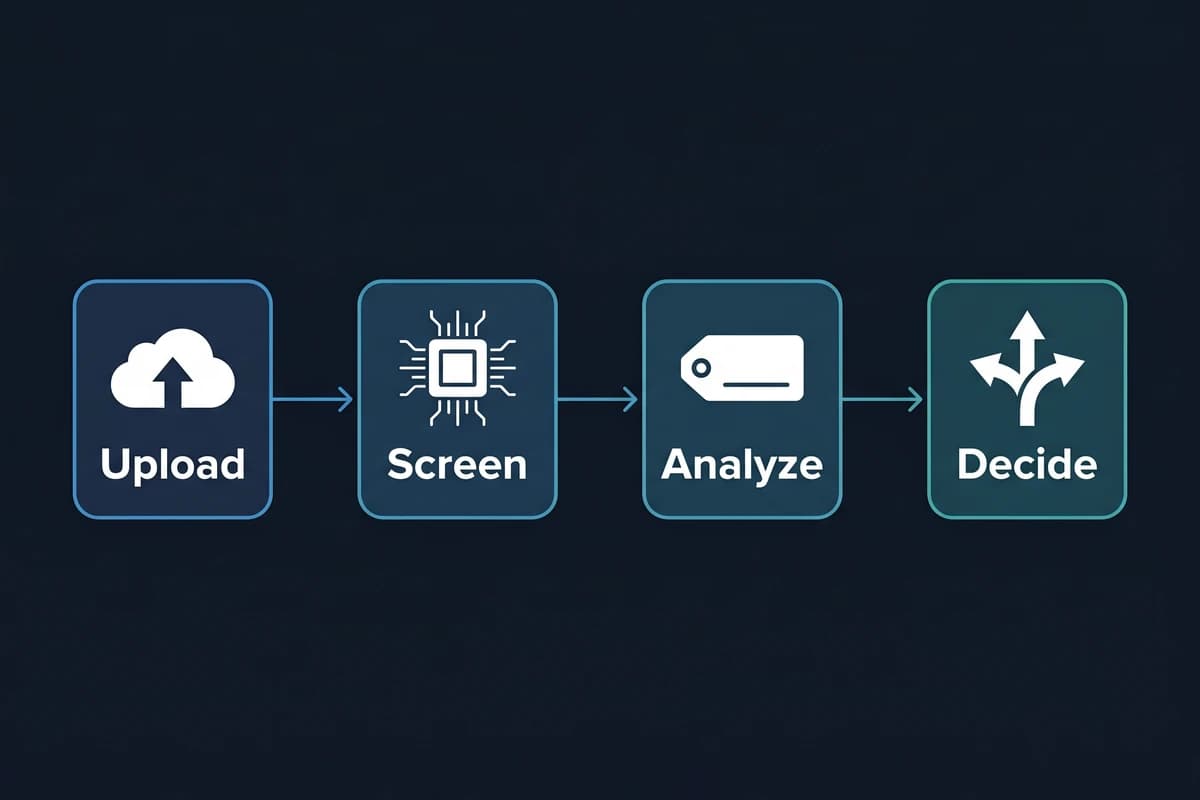
POST /detect call drives the routing logic.The decision step is yours, not the API's. The API returns scored signals; your trust-and-safety policy decides what confidence on which category means auto-reject, what means queue-for-review, and what passes. That separation keeps moderation behaviour under your control and auditable, which matters for the regulatory obligations covered below.
What the content moderation and label services return
The detect-moderation service returns a confidence score per unsafe category. The detect-labels service returns the objects, brands and scene concepts present in the image. Together they cover the categories an e-commerce trust-and-safety team screens for.
| What you screen for | Pixicular service | Example on a listing |
|---|---|---|
| Explicit nudity & sexual content | detect-moderation | Lingerie listings used as a vector for explicit imagery |
| Violence & weapons | detect-moderation | Knives, firearms or graphic injury in a product shot |
| Suggestive / borderline content | detect-moderation | Borderline imagery that needs a human reviewer, not an auto-block |
| Drugs, tobacco & regulated goods | detect-moderation | Restricted substances or paraphernalia in the photo |
| Counterfeit & brand indicators | detect-labels | Designer logos on generic goods, replica-style framing |
| Prohibited objects | detect-labels | Currency, weapons or other policy-restricted objects |
| Listing quality signals | detect-labels | Stock-photo backgrounds, screenshots, irrelevant images |

Note: Pixicular's AI-generated image detection service is currently disabled while accuracy is being improved. The content-moderation and label-detection services above are live and are what e-commerce platforms use for product image screening today.
Code: the moderation API call
One request asks for both services. The image goes up once; the response is a single JSON document with one key per requested service.
curl
curl -X POST https://api.pixicular.com/detect \
  -H "Authorization: Bearer $PIXICULAR_API_KEY" \
  -F "image=@./listing-photo.jpg" \
  -F "services=detect-moderation,detect-labels"
TypeScript — screen before publish
// Screen a seller-uploaded product image before the listing goes live.
async function screenListingImage(file: Blob) {
  const body = new FormData();
  body.append("image", file);
  body.append("services", "detect-moderation,detect-labels");

  const res = await fetch("https://api.pixicular.com/detect", {
    method: "POST",
    headers: { Authorization: `Bearer ${process.env.PIXICULAR_API_KEY}` },
    body,
  });
  const result = await res.json();

  const moderation = result["detect-moderation"]?.flags ?? [];
  const labels = result["detect-labels"]?.labels ?? [];

  // Per-category thresholds owned by your trust & safety policy.
  const blocked = moderation.some(
    (f: { name: string; confidence: number }) =>
      (f.name === "Explicit Nudity" && f.confidence >= 0.9) ||
      (f.name === "Violence" && f.confidence >= 0.85),
  );
  const counterfeitSignal = labels.some(
    (l: { name: string; confidence: number }) =>
      l.name === "Designer Logo" && l.confidence >= 0.7,
  );

  if (blocked) return "reject";
  if (counterfeitSignal) return "queue_for_review";
  return "approve";
}
The thresholds in this snippet are illustrative — your trust-and-safety policy owns them. See the Pixicular API documentation for the full response schema, authentication, and the exact field names per service.
Regulatory pressure: DSA Article 16 notice-and-action
The EU Digital Services Act puts marketplace image moderation firmly inside a compliance perimeter. Article 16 requires hosting providers and online platforms, including e-commerce marketplaces, to operate a notice-and-action mechanism: any individual or entity must be able to flag content they consider illegal, and the platform must process those notices in a timely, diligent, non-arbitrary and objective way, then notify the reporter of its decision and the available redress.
Automated image screening does not satisfy Article 16 on its own — the notice-and-action mechanism is a separate, mandatory channel. But it materially changes the obligation in three ways. First, proactive detection reduces the volume of illegal imagery that ever reaches a buyer, shrinking the notice queue. Second, every screened listing carries stored moderation and label scores, which is the evidence trail your team needs to action a notice quickly and produce the statement of reasons Article 17 requires. Third, consistent automated thresholds make decisions non-arbitrary and reproducible, which is exactly the standard regulators expect when they audit moderation behaviour. Pair the API with a human review queue for borderline cases and you have a defensible pipeline rather than a backlog. This is general information, not legal advice — confirm your obligations with counsel.
When to auto-block, queue, or approve
- Auto-reject on high-confidence unsafe categories — explicit nudity, violence and weapons above a strict threshold should never reach a buyer.
- Queue for review on borderline confidence or counterfeit-indicator labels — a human reviewer decides, with the scored evidence attached.
- Approve when no category exceeds threshold and labels match the expected product type — the listing publishes with no human in the loop.
- This same model extends to UGC image moderation for social platforms and other user-upload surfaces — see what image content moderation is for the broader picture.
Frequently asked questions
How do you moderate product images automatically?
You send each seller-uploaded image to an image moderation API as part of the listing pipeline. Pixicular's detect-moderation service returns confidence scores for unsafe categories such as explicit nudity, violence and weapons, while detect-labels returns the objects and concepts in the image. Your service compares those scores to per-category thresholds and routes the listing to approve, queue-for-review, or reject — no human looks at the safe majority.
Which services should an e-commerce platform use to screen product images?
Two live Pixicular services cover most marketplace screening: detect-moderation for prohibited and unsafe content (nudity, explicit sexual content, violence, weapons, suggestive material) and detect-labels for objects, brands and scene concepts that surface counterfeit and prohibited-goods indicators. Both run in a single POST /detect request, so each listing photo is one API call rather than several.
Can image moderation detect counterfeit or prohibited goods?
Image moderation does not make a legal counterfeit determination, but label detection surfaces strong indicators — designer logos on suspiciously generic products, replica-style framing, weapons, currency, or regulated items — that you can combine with listing text and seller history to flag a listing for human review. The content-moderation service independently handles unsafe imagery such as nudity and violence.
Does automated image screening satisfy DSA Article 16 obligations?
DSA Article 16 requires online platforms to operate notice-and-action mechanisms so anyone can report illegal content and get a timely, reasoned decision. Automated image screening does not replace that mechanism, but it strengthens it: proactive detection reduces the volume of illegal images that reach buyers, and storing moderation scores per listing gives your trust-and-safety team the evidence trail needed to act on notices quickly and explain decisions.
Is Pixicular's AI-generated image detection available for product photos?
Not yet. Pixicular's AI-generated image detection service is currently disabled while accuracy is being improved. The content-moderation and label-detection services described on this page are live today and are what e-commerce platforms use for product image screening. Do not depend on AI-generation detection for production moderation until it returns.
Add image moderation to your listing pipeline
The fastest way to evaluate Pixicular for product image screening is to point a curl request at it with a real listing photo. Pick a plan on the pricing page and follow the API documentation for authentication and the full response schema for detect-moderation and detect-labels.